
In today’s hyper-connected world, our smartphones have become the gateway to our personal and professional lives. From online banking and digital payments to private conversations, emails, browsing, and remote work — a single device carries more sensitive information than ever before.
This convenience, however, comes with risks. Cybercriminals constantly target mobile users through unsecured Wi-Fi, malicious apps, phishing links, and data interception techniques. To shield yourself effectively, using a VPN (Virtual Private Network) on your smartphone can be one of the smartest cybersecurity decisions you make.
In this comprehensive guide, we will explore:
- What a smartphone VPN is
- How Do VPNs protect your mobile data
- Why you should consider using a VPN on Android or iPhone
- Key situations where VPNs are most beneficial
- VPN setup basics
- Tips to stay protected online
- Frequently asked questions
What is a VPN?
A VPN (Virtual Private Network) is a technology that encrypts the internet data that enters or leaves your device. It works like a secure tunnel that hides your identity, activities, and data from anyone trying to snoop on your connection.
Without a VPN:
- Your online actions may be visible to hackers, advertisers, network owners, or even your Internet Service Provider (ISP)
With a VPN:
- Your data is scrambled into unreadable form
- Your real location is masked
- Your online activities stay private
A VPN acts as a shield between you and the internet — ensuring your personal data stays only with you.
How Does a Smartphone VPN Work?
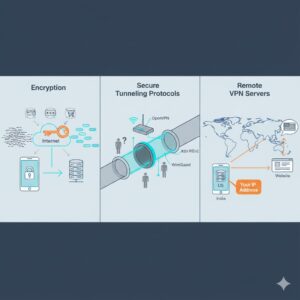
VPN apps use three core technologies to secure your connection:
Encryption
All your data is converted into a secure, unreadable format that only the intended server can decode. This prevents:
- Password theft
- Session hijacking
- Interception during online banking or shopping
Even if a hacker captures your data, encrypted information is useless without the correct decryption key.
Secure Tunneling Protocols
The VPN creates a private tunnel inside your regular connection so that:
- Other users on the same Wi-Fi cannot spy on you
- Public networks cannot track your online movements
Protocols like OpenVPN, IKEv2, or WireGuard help ensure both speed and security.
Remote VPN Servers
Your internet requests are routed through servers located globally.
This changes what websites see as your origin — only the VPN server location appears visible, never your real IP address.
For example:
- You could be in India while browsing through a server in the US
- Websites assume the US server is the user
This creates a strong layer of anonymity.
Why Should You Use a VPN on Your Smartphone?
Smartphones are constantly connected — through Wi-Fi or mobile data — making them more vulnerable to:
- Identity theft
- Credential hacking
- Network spying
- Malware-based attacks
- Data tracking by apps
- Location surveillance
Here are the biggest benefits of using a VPN:
Stronger Online Privacy
A VPN hides:
- Your local IP address
- Your digital footprint
- Websites you visit
- Who you message and what you download
No one can monitor your browsing — not cybercriminals, not trackers, not advertisers.
Also Read: What Is a Boot Sector Virus? A Complete Explanation
Safe Online Banking and Shopping
Payment data like:
- Credit card or UPI details
- Bank account logins
becomes fully encrypted — even on risky networks.
Protection on Public Wi-Fi
Cafés, airports, hotels, and malls usually offer Wi-Fi that is:
- Unencrypted
- Openly accessible
- Monitored by unknown admins
A VPN blocks:
- Packet sniffing
- Man-in-the-middle attacks
- Rogue Wi-Fi hotspots
Bypass Geo-Restricted Content
Streaming platforms and websites restrict content by region.
With VPN servers worldwide, you can:
- Access global streaming catalogs
- Watch home-country content while traveling
- Reach blocked news or educational content
Avoid Price Tracking and Manipulation
Airlines, travel websites, and even e-commerce portals raise prices based on:
- Your browsing history
- Your past searches
- Your location
A VPN helps you compare true prices privately.
More Secure Remote Work
If you access business files on the go, VPN encryption safeguards:
- Company emails
- Shared documents
- Work applications
When Should You Turn On Your Smartphone VPN?
Many users think VPNs are only for hacking emergencies — but everyday browsing can expose your data.
You should especially use a VPN when:
| Situation | Risk | VPN Benefit |
| Using public Wi-Fi | Network snooping | Encrypts every request |
| Shopping online | Card theft | Keeps payment data private |
| Checking bank accounts | Session interception | Blocks credential theft |
| Accessing work servers | Sensitive files exposed | Adds business-grade security |
| Traveling abroad | Data restrictions | Unlocks home content |
| Browsing social apps | Activity tracking | Hides identity and location |
Best practice:
✔ Keep your VPN ON whenever you are connected to the internet
How to Use a VPN on Android or iPhone
Most modern VPN apps are designed for simplicity:
Step-by-Step Setup
- Download a reputable VPN from the official Play Store or App Store
- Install the app and sign up for a plan
- Choose a server location (or use Auto-Connect for fastest performance)
- Toggle the ON button — and your data is secured instantly
Advanced Options for Tech-Savvy Users
- Select preferred encryption protocols for better speed or extra protection
- Enable Kill Switch to avoid accidental data leaks
- Set auto-connect on untrusted Wi-Fi networks
Once set up, using a VPN becomes as easy as flipping a switch.
Important Security Note
A VPN protects internet-based communications.
However, standard:
- SMS text messages
- Regular voice calls
do not travel through the internet and remain outside VPN protection.
To secure voice & text:
- Use VoIP calling apps (e.g., FaceTime, WhatsApp, Telegram)
- Use messaging apps with end-to-end encryption
Tips to Stay Safe While Using a VPN
To maximize security:
✔ Keep your smartphone OS updated
✔ Avoid questionable download sources
✔ Do not grant unnecessary app permissions
✔ Enable lock screen and biometric security
✔ Turn off Bluetooth and Wi-Fi when not needed
✔ Never share passwords on unsecured messaging apps
Remember:
A VPN helps a lot — but good digital habits help even more.
Do All VPNs Provide the Same Security?
No. Choosing the right VPN matters.
When selecting a provider, look for:
- Strong AES-256 or equivalent encryption
- Transparent no-logs policy
- Secure protocols like WireGuard or IKEv2
- Server availability in multiple countries
- Reliable speed for uninterrupted use
Avoid:
- Completely free VPNs that log or sell user data
- Unknown apps outside official app stores
FAQs
Do I need a VPN if I use mobile data instead of Wi-Fi?
Yes. Mobile networks can still be monitored by ISPs or intercepted through sophisticated attacks. A VPN ensures full privacy.
Will a VPN slow down my phone?
Slightly — because data is encrypted and routed.
However, good VPNs maintain fast speeds with optimized servers.
Is using a VPN legal?
In most countries, yes.
However, some regions have restrictions — always comply with local laws when traveling.
Should a VPN always remain on?
For maximum protection — yes.
Auto-connect features make this easy.
Can I use one VPN subscription across multiple devices?
Most VPN providers support simultaneous protection on smartphones, laptops, and tablets. Check your plan’s limits.
Conclusion
As smartphones become more central to our lives, protecting mobile privacy is no longer optional — it’s essential. A smartphone VPN is one of the most powerful tools for:
- Preventing cyber-attacks
- Safeguarding sensitive transactions
- Keeping your identity hidden
- Maintaining digital freedom on the go
Whether you travel frequently, work remotely, shop online, or simply browse casually — a VPN creates a strong defense against digital threats.
Now that you understand how VPNs work and why they matter, you can enjoy faster, safer, and more private internet access everywhere you go.



