
Wi-Fi has become so normal in our daily lives that we rarely stop to think about what’s happening behind the scenes when we connect to a network. Whether you’re opening Instagram on your phone, joining a Zoom call on your laptop, or using a smart TV at home—your device is constantly sending and receiving data over Wi-Fi.
But what if the Wi-Fi security you trust could be bypassed?
That’s exactly what KRACK is about.
KRACK is a serious Wi-Fi vulnerability that exposed weaknesses in WPA2, one of the most commonly used Wi-Fi security protocols in the world. This attack shook the cybersecurity industry because it showed that even password-protected Wi-Fi networks could be vulnerable under certain conditions.
In this blog, we’ll break down what KRACK is, how the krack wifi attack works, why it’s dangerous, who is at risk, and what you can do to stay protected.
What is KRACK?

KRACK stands for Key Reinstallation Attack.
It is a type of attack that exploits a flaw in the WPA2 security protocol, which is widely used to protect Wi-Fi networks. WPA2 is meant to keep your internet activity private by encrypting the data you transmit—like passwords, emails, and messages.
The problem? KRACK attackers can manipulate the encryption process and force a device to reuse an encryption key, making it easier to intercept and read data.
In simple terms:
KRACK doesn’t steal your Wi-Fi password directly
KRACK breaks the security of your Wi-Fi connection
KRACK can allow attackers to read data you thought was protected
This is why the term krack wifi became so widely searched—because it made people realize that Wi-Fi encryption itself could be exploited.
What is a KRACK Attack in Wi-Fi Security?
To understand KRACK properly, you need to understand what it targets:
WPA2: The Security Standard Behind Most Wi-Fi Networks
WPA2 (Wi-Fi Protected Access 2) is the encryption standard that protects most password-based Wi-Fi connections. Whether you’re using Wi-Fi at home, in a café, or in an office—there’s a high chance it’s using WPA2.
WPA2 is designed to:
- Encrypt data between your device and your router
- Prevent attackers from reading your data even if they intercept it
- Ensure secure connections for multiple devices on the same Wi-Fi
However, KRACK doesn’t attack WPA2 encryption directly like brute force attempts. Instead, it attacks the Wi-Fi connection process used to set up encryption.
How KRACK Works (Step-by-Step)
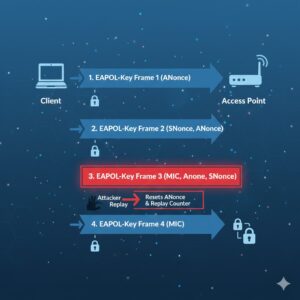
The KRACK attack takes advantage of a weakness in the WPA2 connection setup process. This setup process is called the four-way handshake.
Let’s break it down in an easy way.
WPA2 Four-Way Handshake: The Security “Handshake” That Connects You
When your phone or laptop connects to a protected Wi-Fi network, it doesn’t instantly start transmitting private data.
First, it performs a four-way handshake, which is basically a secure communication procedure between:
- Client device (your smartphone, laptop, tablet, smart TV)
- Access point (your router or Wi-Fi hotspot)
The purpose of this handshake is to confirm that both sides have the correct credentials (such as the Wi-Fi password) and to generate encryption keys to protect data transmission.
Why Is This Handshake Important?
The handshake ensures that:
- Your Wi-Fi password is verified securely
- A new encryption key is established
- Your connection stays safe from eavesdropping
This is also why people are told:
✅ Use password-protected Wi-Fi
❌ Avoid open public Wi-Fi
Because encryption can protect your data even in shared environments.
But KRACK targets a weakness inside this handshake process.
KRACK Exploits Step 3 of the Handshake
Here’s the key point:
✅ KRACK affects the third message in the four-way handshake.
In a normal handshake, step 3 instructs your device to install the encryption key and begin encrypted communication.
What KRACK does is clever and dangerous:
The Key Reinstallation Trick
An attacker can force your device to:
- Reinstall an encryption key that was already in use
- Reset important encryption parameters
This is exactly why the attack is called a Key Reinstallation Attack
Also Read: What Is a Tunneling Protocol?
What Gets Reset During KRACK?
When the key is reinstalled, WPA2 resets certain values that should never be reused.
Two important things get reset:
1) Nonce (Number Once Used)
A nonce is an incremental counter used in encryption to ensure that every transmission remains unique.
If the nonce resets, encrypted traffic can become predictable, which weakens security.
2) Replay Counter
This is used to prevent the same packet from being sent again and again (replay attacks).
If this resets, the protocol may accept repeated transmissions.
In short: KRACK makes encryption reuse elements that are supposed to be one-time-use only.
How Replay Manipulation Breaks Wi-Fi Encryption
After resetting these values, attackers can repeatedly replay the handshake step and force the device to behave in a vulnerable way.
Instead of smoothly moving from step 3 to step 4 of the handshake, the connection can be manipulated again and again.
This allows attackers to:
- Intercept transmitted data
- Decrypt or partially decode encrypted traffic
- Inject malicious content under certain conditions
That’s why krack wifi is considered a major vulnerability—not because it breaks Wi-Fi passwords, but because it breaks the encryption setup process.
Why KRACK Is a Serious Threat
A lot of people think Wi-Fi attacks only affect “tech people.”
But KRACK impacts almost everyone, because almost everyone uses Wi-Fi daily.
Here’s what attackers can potentially do with KRACK:
Read transmitted data
Attackers can intercept and potentially read data like:
- Login credentials
- Emails
- Private messages
- Photos sent over insecure connections
- Browsing activity in certain scenarios
Steal usernames and passwords
If a user logs in on an unencrypted HTTP site or if the attacker performs content injection, credentials could be exposed.
Spy on sensitive activity
If encryption is weakened, attackers can capture what you do online—especially on poorly protected websites or apps.
Use collected data for blackmail or fraud
Captured data could be used to:
- Blackmail victims
- Commit identity fraud
- Sell stolen data in illegal marketplaces
KRACK and Malware: How Attacks Can Become Worse
KRACK itself is powerful—but it can become more dangerous if attackers combine it with other techniques.
Example: HTTP Content Injection
If a user visits a non-HTTPS website, an attacker could inject malicious scripts or content.
This may lead to:
- Malware downloads
- Browser hijacking
- Redirects to harmful pages
- Device takeover risks in extreme cases
This is why browsing on unsecured sites while connected to risky Wi-Fi networks is still a huge threat.
KRACK and IoT Devices: The Hidden Danger in Smart Homes
One of the biggest reasons KRACK caused panic is because it doesn’t only affect laptops and smartphones.
It also affects IoT (Internet of Things) devices like:
- Smart cameras
- Smart locks
- Smart speakers
- Smart TVs
- Wi-Fi printers
- Smart bulbs
- Home automation hubs
Why IoT Devices Are More at Risk
IoT devices often have:
- Weak security controls
- Infrequent firmware updates
- Limited user management options
- Poor long-term support from manufacturers
So even if your phone gets updated quickly, your smart camera might stay vulnerable.
That means KRACK could potentially become a gateway into a full home network compromise.
Attack Requirements: The One Limitation of KRACK
Here’s the only major “good news”:
KRACK attackers usually need to be close to the target
This makes KRACK less likely to be used in massive global attacks, because the attacker must be within Wi-Fi range.
But That Doesn’t Mean You’re Safe
KRACK is especially dangerous in places like:
- Cafés
- Airports
- Hotels
- Co-working spaces
- Colleges and hostels
- Office buildings
- Apartment complexes
Because attackers can operate nearby without being noticed.
In other words, KRACK is often more useful for targeted attacks.
Who Is at Risk from KRACK?
The Simple Answer: Everyone Using Wi-Fi
KRACK impacts nearly all WPA2-supported Wi-Fi devices, including:
- Android phones
- iPhones
- Windows laptops
- MacBooks
- Tablets
- Routers and access points
- Smart home devices
Device Updates Matter a Lot
Some platforms were patched faster than others, but the real risk wasn’t only phones and laptops.
The real long-term problem includes:
Old routers that don’t get updates
IoT devices that never receive patches
Users who ignore firmware upgrades
Even today, older devices that never received security support can remain exposed.
How to Prevent KRACK Attacks (Best Protection Steps)
The best defense against KRACK is reducing exposure and ensuring your devices are protected with modern updates.
Let’s go through practical steps you can follow.
1. Update Your Devices Regularly
The first thing you should do is:
Keep your operating system up to date
Install security patches whenever available
Updates often fix issues in the Wi-Fi connection system, including handshake vulnerabilities.
This applies to:
- Android and iOS devices
- Windows and macOS
- Linux-based systems
2. Update Router Firmware
Your Wi-Fi router is the core of your network. If it’s outdated, your entire network may remain at risk.
What You Should Do
- Log in to your router admin panel
- Check for firmware updates
- Enable auto-updates if your router supports it
- Replace routers that no longer receive security support
Many people upgrade phones frequently but use the same router for 5–8 years. That’s a big security risk.
3. Secure Your Public Wi-Fi Usage
KRACK is far more dangerous in public spaces because the attacker can sit nearby and target victims silently.
Safer habits include:
- Avoid logging into sensitive accounts on public Wi-Fi
- Avoid banking transactions on public networks
- Use mobile hotspot if possible
Even if public Wi-Fi has a password, it doesn’t always mean it’s safe—because that password may be shared with dozens of strangers.
4. Use a Trusted VPN on Public Networks
A VPN creates an encrypted tunnel between your device and the VPN server. Even if someone tries to intercept your Wi-Fi traffic, they see scrambled information.
A VPN is especially helpful when:
- Traveling
- Using airport Wi-Fi
- Working from cafés
- Accessing office resources remotely
Just make sure you choose a trusted service and avoid unknown free tools that may come with privacy risks.
5. Prefer WPA3 Networks When Available
WPA3 is the upgraded Wi-Fi security protocol designed to replace WPA2.
It offers stronger protection against several types of Wi-Fi attacks, including handshake-related weaknesses.
How to move toward WPA3
- Buy a WPA3-supported router
- Enable WPA3 mode if available
- Ensure your devices support WPA3
Even if you cannot switch immediately, moving to WPA3 gradually improves your overall Wi-Fi security posture.
Conclusion
KRACK (Key Reinstallation Attack) is one of the most important Wi-Fi vulnerabilities ever discovered because it exposed a flaw in the WPA2 handshake process.
While KRACK does not directly steal Wi-Fi passwords, it can weaken encryption, allowing attackers in close range to intercept and manipulate data transmissions.
The best protection is still simple but powerful:
Keep devices updated
Update router firmware
Avoid unsafe public Wi-Fi usage
Use a trusted VPN
Shift to WPA3 when possible
Wi-Fi is convenient—but security should never be optional.
FAQs
What is KRACK in simple words?
KRACK is a Wi-Fi vulnerability that allows attackers to exploit WPA2 encryption by forcing devices to reinstall an encryption key during the connection process.
Is KRACK a virus or malware?
No. KRACK is not malware. It is an attack method used to exploit Wi-Fi encryption weaknesses. However, it can be combined with other methods to deliver malware.
Can KRACK steal my Wi-Fi password?
KRACK typically does not steal your Wi-Fi password directly. Instead, it targets the encryption key installation process to read transmitted data.
How dangerous is krack wifi in public places?
Very dangerous if your device or router is unpatched. Public networks increase risk because attackers can stay close to targets without being noticed.
Does HTTPS protect against KRACK?
HTTPS helps a lot because it encrypts website traffic. Even if Wi-Fi encryption is weakened, HTTPS makes it harder for attackers to read the actual content.
However, it’s not a complete guarantee if advanced injection techniques are involved.
Are smart home devices at risk from KRACK?
Yes. IoT devices are often at higher risk because many of them don’t receive timely firmware updates, making them easier targets on vulnerable networks.



