
In today’s hyper-connected world, cloud computing has become the backbone of modern digital infrastructure. Businesses, organizations, and individuals rely on the cloud for everything from storing files and running applications to managing large-scale operations across continents. This convenience, however, comes with significant responsibility — ensuring that the data stored and processed in the cloud remains safe. This is where cloud security plays a crucial role.
Cloud security is the practice of protecting cloud-based systems, data, and infrastructure from cyber threats. It ensures the confidentiality, integrity, and availability of information stored in cloud environments. Since both cloud providers and users share the responsibility for security, understanding how it works and how to apply best practices is essential for keeping your data secure.
In this detailed guide, we will explore what cloud security is, how it works, its components, common risks, and best practices to safeguard your cloud environment effectively.
What Is Cloud Security?
Cloud security is a discipline within cybersecurity focused on securing cloud computing systems. It encompasses a range of technologies, policies, and procedures designed to protect data, applications, and services hosted in the cloud from unauthorized access, data breaches, and cyberattacks.
At its core, cloud security involves collaboration between the cloud service provider and the client (the user). Providers secure the infrastructure — servers, storage, and networking — while clients must manage secure configurations, user access, and safe data-handling practices.
Cloud security ensures that data stored in online servers remains protected, whether accessed by individuals, small businesses, or global enterprises. It also addresses privacy, compliance, and risk management concerns that arise when sensitive information is moved beyond traditional on-premises systems.
Key Components of Cloud Security
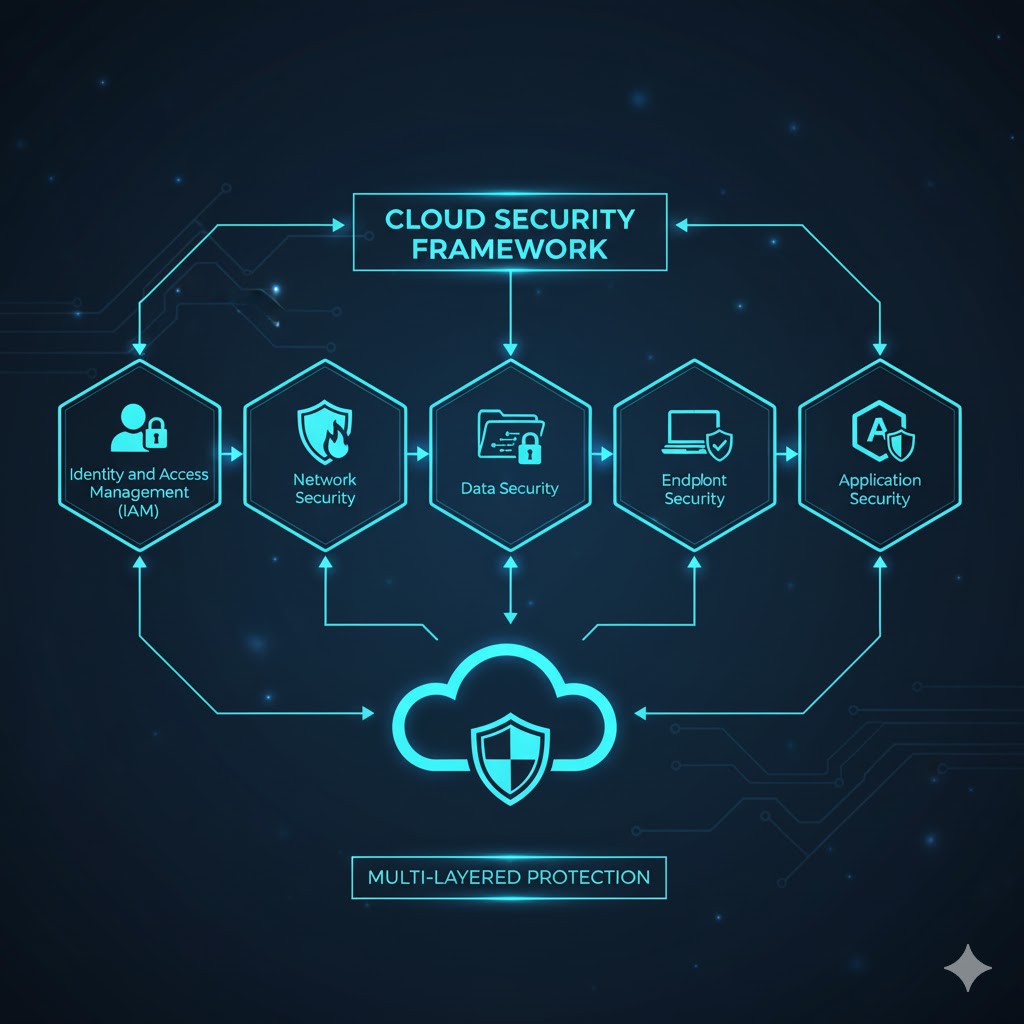
Cloud security consists of multiple components that work together to build a secure digital ecosystem. Each element has a specific role in preventing unauthorized access, ensuring compliance, and maintaining smooth operations.
Data Security
Data is the most valuable asset in the cloud, making data security a top priority. It involves protecting information from theft, loss, or corruption through methods such as encryption, tokenization, and masking.
Encryption transforms data into unreadable code, ensuring that even if cybercriminals gain access, they cannot interpret it without the encryption key. Encryption applies to both data at rest (stored in the cloud) and data in transit (being transferred over networks).
Data redundancy and backup strategies also form part of data security. Maintaining multiple copies of data ensures that in case of an outage or breach, recovery is quick and seamless.
Identity and Access Management (IAM)
IAM is the framework that manages who can access what resources within the cloud. It uses authentication (verifying a user’s identity) and authorization (defining what that user can do) to maintain control.
By implementing IAM, organizations can prevent unauthorized access, enforce password policies, and monitor user activity. Common IAM features include multi-factor authentication (MFA), role-based access control (RBAC), and single sign-on (SSO) systems.
Proper access management reduces the likelihood of insider threats, account takeovers, and accidental data leaks.
Governance and Compliance
Governance refers to the set of policies and procedures that guide how security is managed across cloud environments. It defines rules for detecting, preventing, and mitigating threats while ensuring compliance with legal regulations.
Regulatory frameworks like GDPR (General Data Protection Regulation) and HIPAA (Health Insurance Portability and Accountability Act) require organizations to protect personal and sensitive data. Governance ensures that systems are aligned with these legal and ethical standards.
For example, GDPR mandates that businesses implement strong privacy controls, while HIPAA requires healthcare organizations to ensure confidentiality and availability of patient data.
Data Retention and Business Continuity
Business continuity and disaster recovery (BC/DR) planning ensure that operations can continue even in the event of data loss, system failure, or cyberattack.
BC/DR plans typically involve:
- Regular backups of critical data.
- Cloud redundancy (storing copies across multiple servers or regions).
- Testing recovery procedures periodically.
These strategies help organizations minimize downtime and financial loss during unexpected incidents.
How Does Cloud Security Work?
Cloud security works by combining multiple layers of defense across cloud infrastructure, applications, and endpoints. Every cloud security measure aims to achieve one or more of the following:
- Protect data and networks from unauthorized access.
- Enable data recovery after data loss or breach.
- Reduce risks of human error and misconfiguration.
- Maintain compliance with laws and regulations.
Cloud providers typically use built-in security technologies such as firewalls, intrusion detection systems, and encryption to safeguard their infrastructure. However, users are responsible for securing their applications, data, and access settings.
For example, a provider ensures that servers are protected from DDoS (Distributed Denial of Service) attacks, while clients must ensure their employees use strong passwords and avoid phishing scams.
Types of Cloud Services and Their Security Responsibilities
Different cloud service models distribute security responsibilities differently between providers and users.
Software-as-a-Service (SaaS)
In SaaS, the provider manages everything — from the infrastructure and applications to data storage. The user’s responsibility is limited to managing access control and safe use of the service.
Examples: Google Workspace, Salesforce, Microsoft 365.
Platform-as-a-Service (PaaS)
In PaaS, providers manage infrastructure and runtime environments, while users focus on securing their applications and data. Developers can build, deploy, and manage apps without worrying about hardware management.
Examples: Google App Engine, Microsoft Azure, Heroku.
Infrastructure-as-a-Service (IaaS)
IaaS gives users the most control — and therefore the most responsibility. While the provider manages physical infrastructure, users must secure the operating system, applications, data, and network access.
Examples: Amazon Web Services (AWS), Google Compute Engine (GCE), Microsoft Azure.
Understanding these service types helps users identify where their security duties begin and end, avoiding misconfigurations and vulnerabilities.
Types of Cloud Environments
Public Cloud
In a public cloud, resources are shared among multiple users. This setup offers cost efficiency and scalability but poses higher security risks due to multi-tenancy.
Private Cloud
A private cloud is dedicated to one organization, offering more control and customization. It can be hosted on-premises or managed by a third-party provider.
Hybrid Cloud
Hybrid cloud combines public and private cloud environments, allowing data and applications to move between them securely. This model provides flexibility, scalability, and control.
Multi-Cloud
In a multi-cloud setup, organizations use services from multiple providers. This approach reduces dependence on one provider but requires careful coordination of security policies across platforms.
How Cloud Security Differs from Traditional IT Security
Traditional IT security focuses on protecting physical servers and local networks, while cloud security extends to virtualized, online environments.
Key differences include:
- Shared Responsibility: In traditional models, organizations control all infrastructure. In the cloud, providers and clients share the load.
- Scalability: Cloud environments expand quickly, demanding continuous configuration updates.
- Remote Accessibility: Always-on connectivity means data is constantly exposed to potential cyber threats if not properly protected.
Cloud security requires proactive measures and collaboration between users and providers to ensure safety across multiple endpoints.
Common Cloud Security Risks
Cloud computing offers numerous benefits but also introduces new vulnerabilities. The most common cloud security threats include:
- Data breaches due to weak configurations or insider threats.
- Insecure APIs allowing unauthorized access to systems.
- Ransomware and malware targeting cloud-hosted data.
- Account hijacking from phishing or stolen credentials.
- Service outages causing downtime and potential data loss.
- Shadow IT, where employees use unauthorized cloud services without IT oversight.
For example, an AWS outage once resulted in data loss for some customers due to hardware failure, underscoring the importance of backups and redundancy.
Why Cloud Security Is Important
The shift to cloud computing has redefined how data is stored, processed, and accessed. While it offers convenience and flexibility, it also creates a larger attack surface for cybercriminals.
Cloud security is essential because:
- It safeguards sensitive business and personal data from breaches.
- It ensures compliance with laws like GDPR and HIPAA.
- It prevents costly downtime and data loss.
- It builds customer trust and business reputation.
Without proper cloud security, even small vulnerabilities can escalate into large-scale data breaches, costing organizations millions in recovery and legal fines.
Also Read: What is Tor Browser and is it safe?
How to Protect Your Data in the Cloud
Protecting your cloud data requires a combination of technical tools and user awareness.
Use Encryption
Encrypt sensitive data before uploading it to the cloud. End-to-end encryption ensures that only authorized users with the decryption key can access your data. Manage encryption keys securely and avoid storing them in the same environment as your data.
Configure Cloud Services Correctly
Many data breaches occur due to misconfigured storage buckets or default settings. Disable unnecessary features, close open ports, and use security controls provided by your cloud service.
Strengthen Access Control
Implement multi-factor authentication (MFA) and assign users only the permissions they need. Follow the principle of least privilege, restricting administrative rights where possible.
Regular Backups
Keep local backups or use a secondary cloud provider to ensure that data remains recoverable during outages or cyber incidents.
Monitor Cloud Activity
Use monitoring tools to detect unusual activities such as unauthorized logins or data transfers. Regular audits and log reviews help identify threats early.
Avoid Public Wi-Fi Without VPN
Public Wi-Fi networks are easily compromised. Use a Virtual Private Network (VPN) to encrypt your connection when accessing cloud data remotely.
Cloud Security for Different Users
For Small and Medium Businesses (SMBs)
- Use reputable public cloud providers with strong compliance frameworks.
- Encrypt client and company data.
- Control user access and review permissions regularly.
- Stay updated with legal requirements such as GDPR.
For Enterprises
- Implement hybrid or private cloud systems for maximum control.
- Use MFA and zero-trust access policies.
- Monitor employee cloud usage to avoid shadow IT.
- Conduct regular security assessments and penetration tests.
For Individual Users
- Choose cloud services with built-in encryption.
- Use strong, unique passwords and password managers.
- Keep devices updated and protected with antivirus software.
FAQs
What is cloud security?
Cloud security is the combination of tools, policies, and best practices designed to protect cloud-based data, applications, and infrastructure from cyber threats.
Why is cloud security important?
It ensures data privacy, compliance, and business continuity by protecting information from breaches, unauthorized access, and loss.
Who is responsible for cloud security?
Both cloud providers and users share responsibility. Providers secure infrastructure, while users must secure configurations, access, and usage.
What are common cloud security risks?
Risks include data breaches, insecure APIs, insider threats, account hijacking, and misconfigured storage systems.
How can I secure my data in the cloud?
Use encryption, MFA, backups, secure configurations, and strong access controls.
Conclusion
Cloud computing has revolutionized how we store and manage data, but it has also expanded the landscape of potential threats. As a result, cloud security has become an essential pillar of modern cybersecurity.
By understanding the shared responsibility model, implementing encryption, enforcing strict access controls, and ensuring compliance with data protection regulations, individuals and organizations can confidently use the cloud without compromising safety.
The key takeaway is that cloud security is not a one-time task — it’s an ongoing commitment. As technology evolves, staying vigilant and proactive is the best way to protect your digital assets in the cloud.



