
In today’s digital world, security is no longer optional—it’s essential. Whether you’re logging into your email, transferring money through a banking app, accessing company files remotely, or managing customer data on a business dashboard, you’re relying on cybersecurity systems to protect your identity and your information.
Cyber threats like phishing, hacking, malware, credential stuffing, and ransomware are growing more advanced every year. That’s why organizations and service providers implement multiple layers of protection, especially when it comes to controlling who can access systems and what they are allowed to do inside them.
Two of the most important identity and access control concepts in cybersecurity are:
Authentication
Authorization
Many people confuse these terms or use them interchangeably. But in reality, they perform different roles in cybersecurity—and both must work together to build a secure environment.
In this detailed guide, we’ll break down:
- Authentication vs authorization (what they mean and how they work)
- The difference between authenticate vs authorize
- Real-life examples of both
- Types of authentication factors and methods
- Types of authorization models (RBAC, ABAC, etc.)
- Why your security depends on using both correctly
- Frequently asked questions (FAQs)
Let’s start with the basics.
Why Authentication and Authorization Matter in Cybersecurity
Every time you use a digital service, you’re interacting with a system that must answer two critical questions:
- Who are you?
- What are you allowed to do?
These questions are not the same.
- The first question is answered by authentication.
- The second question is answered by authorization.
When businesses or individuals fail to implement these properly, it can lead to:
- Unauthorized access
- Data leaks
- Data breaches
- Account takeovers
- Financial fraud
- Loss of customer trust
So, understanding authentication vs authorization is not just a technical topic—it’s a practical part of staying safe online.
What Is Authentication? (AuthN)
Definition of Authentication
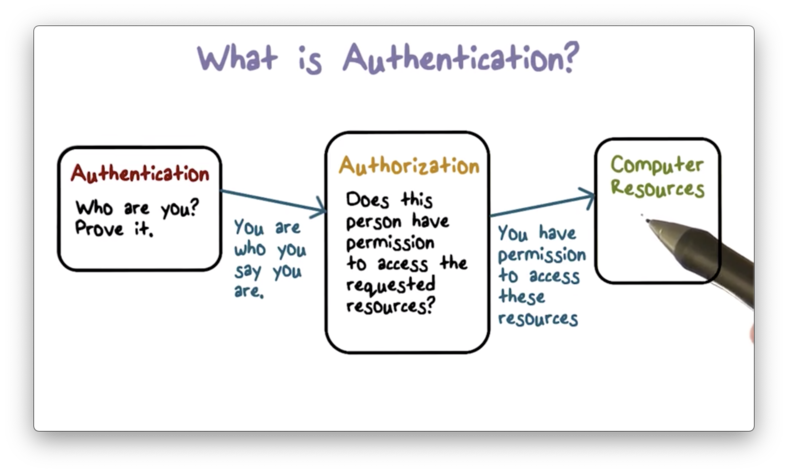
In cybersecurity, authentication (often shortened to AuthN) is the process of verifying a user’s identity—or sometimes a device’s identity—before granting access to a system.
In simple words, authentication confirms:
👉 “You are who you say you are.”
How Authentication Works (Step-by-Step)
When you try to log in to a service, the system typically asks for credentials, such as:
- Username
- Password
- OTP
- Fingerprint
- Face recognition
After you submit your credentials:
- The system checks the information you entered.
- It compares it to what’s stored in its secure database.
- If it matches, authentication succeeds.
- If it doesn’t match, access is denied.
For example:
- You log in to Gmail using your email ID + password.
- The system verifies your credentials.
- If correct, you are authenticated.
Authentication is the gatekeeper of identity verification.
Why Is Authentication Important?
Authentication protects systems, accounts, and sensitive data from unauthorized access. It’s one of the most essential components of cybersecurity.
Here are the major reasons authentication matters:
1. It Protects Sensitive Personal and Business Data
Without authentication, anyone could access private information such as:
- Emails
- Bank balances
- Health records
- Company documents
2. It Reduces the Risk of Data Breaches
Weak authentication often leads to:
- credential theft
- account takeovers
- unauthorized entry into corporate networks
Once an attacker gains access, they can steal or modify critical data.
3. It Prevents Identity Theft and Financial Fraud
If attackers log in as you, they can:
- reset your passwords
- access your financial apps
- impersonate you
Strong authentication reduces that risk significantly.
4. It Helps Maintain Accurate Access Logs
Systems can record:
- who logged in
- when they logged in
- what device they used
- where they accessed from
These records help during investigations and audits.
5. It Protects Networks and Devices
Authentication is not just for websites. It’s also required for:
- corporate VPNs
- internal systems
- cloud dashboards
- network equipment
Types of Authentication Factors
Authentication works through authentication factors, which are categories of proof used to verify identity.
Here are the most common factors used in authentication:
1. Knowledge Factor
Something the user knows, such as:
- password
- PIN
- security question answers
2. Possession Factor
Something the user has, such as:
- smartphone (to receive OTP)
- security token
- smart card
3. Inherence Factor
Something the user is, such as:
- fingerprint
- face recognition
- iris scan
4. Location Factor
Where the user is located, such as:
- GPS-based verification
- access allowed only from office network
5. Time Factor
When access is allowed, such as:
- logins only during business hours
- limited time-based verification links
In modern cybersecurity, combining multiple factors is often the safest approach.
Examples of Authentication Methods
To understand “authenticate vs authorize” properly, you need to know common authentication methods used every day.
1. Password-Based Authentication
This is the most common method:
- username + password
However, it’s also one of the weakest if the password is:
- reused
- short
- easy to guess
2. One-Time Passwords (OTPs)
OTPs are temporary codes sent via:
- SMS
- mobile apps
They provide extra security because the code expires quickly.
3. Tokens
Tokens are generated by secure devices or systems and act like digital keys.
4. Biometric Authentication
This uses physical identity markers such as:
- fingerprint unlock
- facial recognition login
Biometrics are highly convenient and secure when used correctly.
5. Multi-Factor Authentication (MFA)
MFA combines two or more factors such as:
- password + OTP
- password + fingerprint
- OTP + face scan
It drastically reduces unauthorized access risks.
6. Certificate-Based Authentication
This uses digital certificates verified by a trusted authority. It is often used in business environments for secure device and user verification.
7. Device Authentication
Device authentication checks whether a device is trusted before allowing access to:
- corporate networks
- cloud systems
- apps
8. Authentication Apps
Apps generate secure verification codes, providing stronger protection than SMS in many cases.
9. Single Sign-On (SSO)
SSO allows you to log in once and access multiple services. For example:
- logging into a Google account provides access to Gmail, Drive, and other services.
How Is Authentication Used in Daily Life?
Most people use authentication many times daily without thinking about it.
Examples include:
- Logging into corporate email, CRM tools, or work systems
- Using fingerprint unlock on smartphones
- Approving banking transactions with OTP or biometrics
- Signing into an e-commerce site with password
- Confirming credit card payments via OTP
- Accessing digital health records securely
Every one of these actions requires authentication before access is granted.
What Is Authorization? (AuthZ)
Now let’s move to the second key concept.
Definition of Authorization
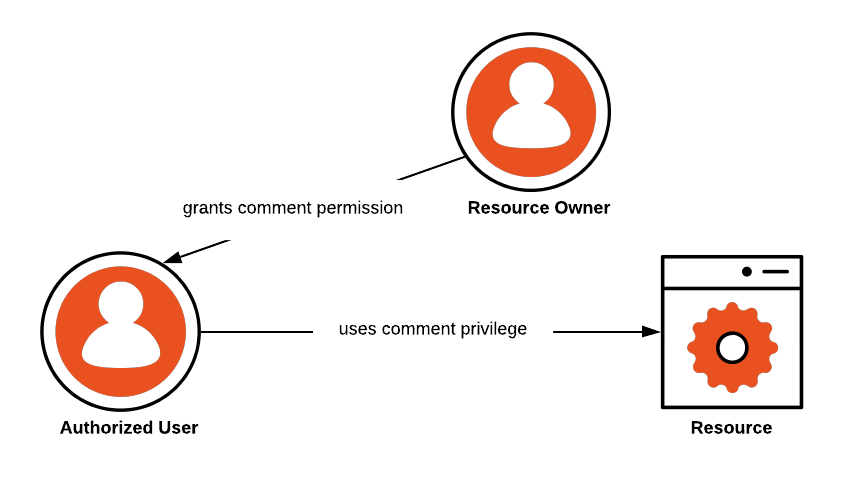
Authorization (often shortened to AuthZ) is the process of deciding what a user can do after they are authenticated.
In simple terms, authorization controls:
👉 “What permissions you have in the system.”
So while authentication checks identity, authorization controls access levels.
Example of Authorization
Imagine a company system:
- An IT Admin can:
- create accounts
- delete files
- change system settings
- A regular employee can:
- view documents
- edit assigned files
- submit reports
Both are authenticated users, but they have different authorization permissions.
Types of Authorization
Authorization is implemented through different access control models. Each model decides how permissions are assigned and enforced.
1. Discretionary Access Control (DAC)
DAC allows administrators to assign permissions based on users’ identities. It gives flexibility but can be risky if mismanaged.
2. Mandatory Access Control (MAC)
MAC is stricter and often used in high-security environments. Permissions are controlled by the system using fixed rules and policies.
3. Role-Based Access Control (RBAC)
RBAC assigns access based on roles:
- HR role → HR files
- Finance role → finance systems
- Admin role → full access
This is one of the most commonly used authorization systems in businesses.
4. Attribute-Based Access Control (ABAC)
ABAC uses attributes and policies such as:
- user department
- device type
- location
- time
- security level
It’s more flexible than RBAC and supports modern dynamic security needs.
5. Access Control Lists (ACLs)
ACLs define exactly which users can access a file or system resource. For example:
- Employee A can read
- Employee B can edit
- Employee C has no access
How Is Authorization Used?
Authorization is used to protect resources and reduce risk. It ensures users only access what they need.
Authorization helps in the following ways:
1. Safe Access to Secure Features
For example, banking apps ensure:
- customers can access only their own accounts
2. Preventing Users from Accessing Others’ Data
In social media or email platforms:
- your account stays private from others due to authorization rules
3. SaaS Permission Levels
Software platforms often offer:
- basic access for free users
- advanced access for premium users
Authorization controls these service tiers.
4. Separating Internal and External Users
Organizations often have:
- employees (internal users)
- customers/clients (external users)
Authorization rules keep access separated.
5. Limiting Damage in Case of a Breach
Authorization follows the principle of least privilege, meaning:
- users get the lowest level of access required
So even if an attacker hijacks an employee account, they can’t access everything.
Authentication vs Authorization: Similarities and Differences
Now let’s compare authentication vs authorization in the clearest way.
Key Differences: Authenticate vs Authorize
Here’s how they differ:
1. Purpose
- Authentication: Confirms identity
- Authorization: Grants permissions
2. What It Checks
- Authentication: “Are you a valid user?”
- Authorization: “What can you access?”
3. When It Happens
- Authentication: First step
- Authorization: Second step
4. How It Works
- Authentication: Requires user input (password/OTP/biometric)
- Authorization: Runs automatically using policies and roles
5. Data Used
- Authentication: Uses credentials provided by the user
- Authorization: Uses access tokens and permission policies
6. Standards and Methods
- Authentication: Often involves methods like passwords, biometrics, and identity protocols
- Authorization: Often involves access control models like RBAC, ABAC, and token-based systems
Similarities Between Authentication and Authorization
Even though they are different, authentication and authorization share key similarities:
- Both are essential for cybersecurity
- Both help protect systems, accounts, and data
- Both work together in sequence (AuthN → AuthZ)
- Both support strong identity and access management
- Both are used in almost every online service
Why Both Authentication and Authorization Are Needed Together
You cannot rely on only one layer.
Why Authentication Alone Isn’t Enough
If a system only authenticates users, then anyone who logs in might gain access to everything inside.
That’s dangerous.
Why Authorization Alone Isn’t Enough
Authorization makes no sense if the system doesn’t know who the user is first.
So authentication must happen before authorization.
The Best Security Model
Authentication verifies the identity.
Authorization controls permissions.
Together, they create a secure environment.
This is the foundation of modern cybersecurity.
Conclusion
Understanding authentication vs authorization is one of the most important lessons in cybersecurity.
To summarize in one line:
- Authentication is identity verification.
- Authorization is permission control.
Or even simpler:
Authenticate = Who are you?
Authorize = What can you do?
From banking apps and workplace systems to SaaS platforms and e-commerce accounts, these two security layers protect users and organizations every day.
When implemented properly with modern best practices like MFA and least privilege, authentication and authorization can dramatically reduce the chances of unauthorized access and cyberattacks.
FAQs
What is the difference between authentication and authorization?
Authentication verifies identity (who you are), while authorization decides permissions (what you can access after login).
What comes first: authentication or authorization?
Authentication always comes first. Authorization happens only after authentication succeeds.
Can authorization happen without authentication?
In secure systems, no. Authorization requires a verified identity first.
What is an example of authentication vs authorization in real life?
Authentication: logging into your email with password and OTP
Authorization: being able to read your inbox but not someone else’s
Is MFA authentication or authorization?
MFA is an authentication method because it verifies identity using multiple factors.
Why is authorization important in businesses?
Authorization protects sensitive resources by limiting employee access based on roles, reducing insider risk and breach impact.

Debabrata Behera is a passionate blogger who writes about digital trends, personal growth, and practical insights, helping readers stay informed, inspired, and ready to achieve success in life.



