
Browsing the internet has become an inseparable part of everyday life. From online banking and shopping to remote work and entertainment, almost everything we do now depends on web access. However, this convenience comes with growing risks. Every website you visit, every search you make, and every form you fill out can potentially expose personal data to internet service providers, advertisers, cybercriminals, and even unsecured networks.
Because of these risks, people often turn to privacy tools like private browsing modes or VPNs to protect themselves online. But a common question remains: is private browsing really secure, and can a VPN truly hide your search history? To fully understand online privacy, it is also important to explore concepts like browser isolation, what browser isolation is, and the difference between browser isolation and remote browser isolation, as these technologies are increasingly used alongside VPNs for stronger protection.
This guide explains how private browsing works, its limitations, how VPNs enhance privacy, and how browser isolation fits into the bigger picture of online security.
What is Private Browsing and How It Works
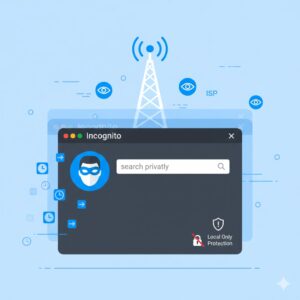
Private browsing is a feature built into most modern web browsers. It is designed to prevent the browser from storing local information on your device. Different browsers offer this feature under different names, but the functionality is largely the same.
When private browsing is enabled, the browser does not save your browsing history, search history, cookies, or form data after the session ends. Once the window is closed, this information is automatically erased from your local system.
This can be useful in shared environments. For example, private browsing prevents other users of the same device from seeing which websites were visited. It also stops websites from remembering login sessions or preferences beyond the current session.
However, private browsing is often misunderstood as a complete privacy solution. While it limits what is stored locally, it does not stop data from being transmitted over the internet.
Is Private Browsing Really Private?
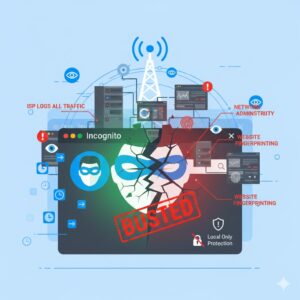
Despite its name, private browsing does not make you invisible online. Your internet activity can still be visible to several parties.
Your internet service provider can still see which websites you visit because your connection passes through their servers. Network administrators, such as those managing workplace or school networks, can also monitor traffic. Websites themselves can still track your activity using IP addresses, browser fingerprinting, or server-side logs.
Private browsing also does not protect against malware, phishing websites, or malicious downloads. If you enter sensitive information on a compromised site, private mode does not offer additional protection beyond what a regular browser provides.
In short, private browsing is a privacy convenience tool, not a security solution.
How Safe Is Private Browsing for Online Security?
A common misconception is that private browsing protects users from cyber threats. While it limits data storage on the device, it does not encrypt traffic or hide identity.
Security vulnerabilities in browsers, unsafe extensions, and malicious scripts can still be exploited during private sessions. Attackers do not need access to your local browsing history to compromise your system. They rely on weaknesses in websites, browsers, and user behavior.
This is why private browsing alone is not sufficient for protecting search history, identity, or sensitive data online.
What Is a VPN and How Does It Protect Privacy?
A VPN, or virtual private network, is a privacy and security tool that encrypts your internet traffic and routes it through a remote server. This process hides your real IP address and replaces it with one provided by the VPN service.
When using a VPN, your internet service provider cannot see which websites you visit. Instead, they only see encrypted traffic going to the VPN server. This makes it significantly harder for third parties to track your online behavior.
VPNs are especially valuable when using public Wi-Fi networks, where attackers can intercept unencrypted data. By encrypting traffic, VPNs reduce the risk of data theft, identity exposure, and unauthorized surveillance.
How a VPN Helps Hide Your Search History

Without a VPN, your browsing data travels openly through your ISP’s infrastructure. This means your searches, visited websites, and online activity can be logged, analyzed, or shared.
A VPN creates a secure tunnel between your device and the VPN server. All data passing through this tunnel is encrypted. Even if someone intercepts the traffic, it appears as unreadable data.
By masking your IP address, a VPN also prevents websites from easily linking activity back to your physical location. This is one of the most effective ways to hide search history from ISPs, network administrators, and data trackers.
How VPNs Work Behind the Scenes
When a VPN is activated, it establishes an encrypted connection between your device and a remote server. Your internet traffic is routed through this server before reaching its destination.
From the perspective of websites and online services, the VPN server appears to be the source of the traffic. This separation between the user and the internet adds a strong layer of privacy.
Encryption ensures that data remains protected during transmission, even on unsecured networks. This makes VPNs far more effective than private browsing when it comes to safeguarding online activity.
Where Browser Isolation Fits Into Online Privacy
While VPNs focus on encrypting traffic, browser isolation takes a different approach. Browser isolation is a security technology that separates web browsing activity from the user’s actual device.
To understand its role, it helps to answer a common question: what is browser isolation?
Browser isolation works by running web content in a separate environment, such as a virtual machine or sandbox. This prevents malicious code from directly interacting with the user’s system. Even if a website contains malware, it remains confined to the isolated environment.
This approach assumes that any website could be dangerous, following a zero-trust model.
Difference Between Browser Isolation and Remote Browser Isolation
The difference between browser isolation and remote browser isolation lies mainly in where the isolation takes place.
In local browser isolation, web content is executed within a sandbox on the user’s device. This provides protection but still relies on local system resources.
Remote browser isolation takes this a step further by executing web content on a remote server, often in the cloud. The user’s device only receives a visual stream of the webpage rather than the actual code. This significantly reduces the attack surface and enhances security.
Remote browser isolation is often used in enterprise environments where exposure to malicious websites must be minimized.
VPN vs Private Browsing vs Browser Isolation
Each of these tools serves a different purpose.
Private browsing focuses on local privacy by preventing data storage on the device. It does not hide activity from external parties.
VPNs protect privacy by encrypting traffic and masking IP addresses, making it difficult for third parties to monitor activity.
Browser isolation protects devices by separating browsing activity from the operating system, preventing malware infections even if unsafe websites are accessed.
When combined, these tools provide layered protection. A VPN hides traffic, browser isolation blocks malicious content, and private browsing prevents local traces.
When Should You Use Each Tool?
Private browsing is useful on shared devices or when you do not want saved sessions.
VPNs are ideal for protecting search history, securing public Wi-Fi connections, and maintaining privacy from ISPs.
Browser isolation is best suited for environments where users frequently access unknown or risky websites, such as corporate networks or research settings.
Understanding these differences helps users choose the right tool for their needs.
Common Myths About Online Privacy Tools
Many users believe that private browsing hides all activity, which is not true. Others assume VPNs protect against all cyber threats, which is also incorrect.
VPNs do not prevent malware infections if users download harmful files. Browser isolation, on the other hand, reduces this risk by containing threats.
No single tool guarantees complete security. Effective online protection requires understanding how each technology works and using them appropriately.
FAQs
Does private browsing hide my search history from my internet provider?
No. Private browsing only prevents local storage of data. Your internet provider can still see your activity.
Can a VPN completely hide my online activity?
A VPN significantly improves privacy by encrypting traffic and masking IP addresses, but it does not protect against unsafe behavior like phishing or malware downloads.
What is browser isolation used for?
Browser isolation is used to protect devices by running web content in an isolated environment, preventing malicious code from affecting the system.
What is the difference between browser isolation and remote browser isolation?
Browser isolation can occur locally or remotely. Remote browser isolation runs web content on external servers, offering stronger protection.
Is browser isolation better than a VPN?
They serve different purposes. VPNs protect privacy, while browser isolation protects systems from web-based threats. They work best together.
Conclusion
Private browsing, VPNs, and browser isolation are often discussed together, but they address different aspects of online security. Private browsing limits local data storage but does not offer true privacy. VPNs encrypt traffic and hide search history from ISPs and network observers. Browser isolation protects devices by preventing malicious web content from reaching the system.
Understanding what browser isolation is, how it differs from remote browser isolation, and how VPNs enhance privacy allows users to make informed decisions about online security. In today’s threat landscape, combining these tools thoughtfully provides the strongest defense against tracking, data exposure, and cyber threats.



