
Physical access control systems (PACS) are a cornerstone of security in today’s increasingly complex business environment. These systems regulate who can enter a physical space, protecting people, property, and assets from unauthorized access. As threats evolve and security demands rise, PACS provide a reliable and scalable solution for organizations of all sizes.
This guide will help you understand what physical access control systems are, how they work, their key components, types, and benefits. It will also cover practical applications, how to choose the right system, and the future of physical access control technology. Whether you’re a business owner, security professional, or facilities manager, this comprehensive resource offers the insights needed to make informed decisions about physical security.
What Is a Physical Access Control System?
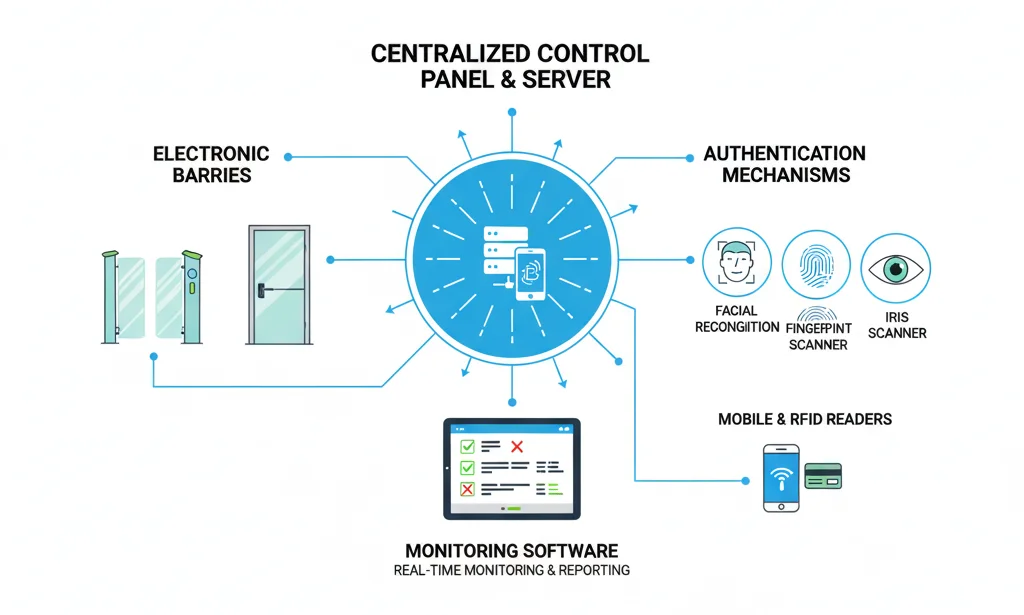
Physical access control systems are electronic solutions designed to authorize or deny access to physical spaces, such as buildings, rooms, or secure areas. Unlike traditional lock-and-key methods, PACS use advanced technology to authenticate individuals using various credentials like key cards, biometric identifiers, or mobile devices.
Key Features of PACS:
- Authentication and Authorization: Ensures only authorized individuals can enter designated areas.
- Electronic Control: Uses electronic barriers such as doors, turnstiles, or gates.
- Enhanced Security: Offers a higher level of protection compared to mechanical locks.
- Management and Monitoring: Allows centralized control over access permissions and real-time event logging.
By using these features, PACS improve safety, reduce theft or vandalism, and streamline entry management.
Key Components of Physical Access Control Systems
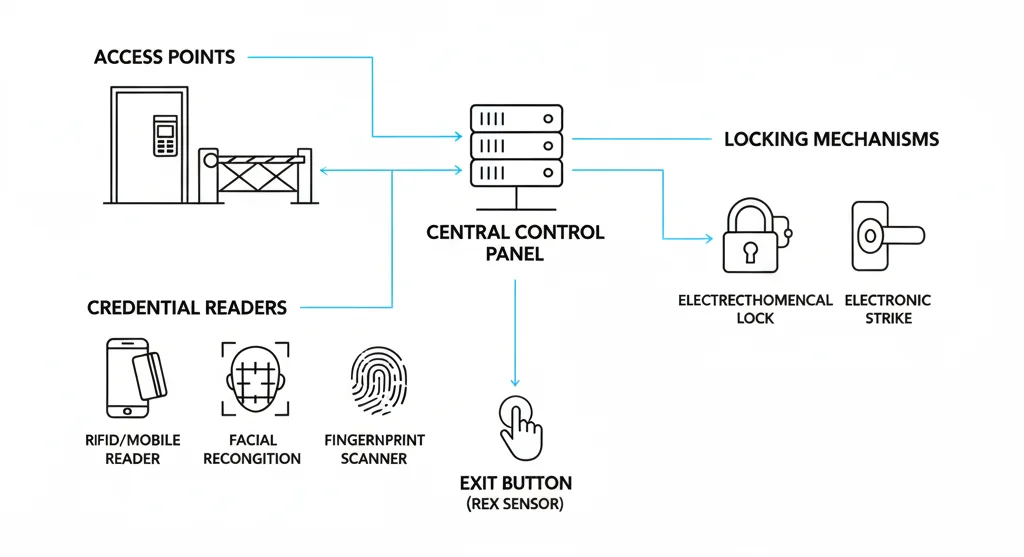
Physical access control systems comprise several critical components working together to secure premises effectively.
- Access Points: These include physical entries like doors, gates, or turnstiles that control entry and exit.
- Credentials: The data used to verify identity, such as key cards, PINs, biometric identifiers (fingerprint, face, iris), or mobile credentials.
- Credential Readers: Devices that read or scan credentials at the access point; examples include card readers, biometric scanners, and keypads.
- Control Panel: The central hardware unit verifying credential authenticity and managing access permissions.
- Access Control Server: Stores user profiles, permissions, and logs, often cloud-based or on-premise.
- Locking Mechanisms: Electromechanical locks, electronic strikes, or standard locks integrated with control systems.
- Exit/Request to Exit (RTE) Devices: Sensors allowing authorized exit without manual unlocking.
- Monitoring and Reporting Software: Provides real-time alerts, logs entry events, and supports audit compliance.
Together, these components enable seamless, secure, and manageable access control.
How Physical Access Control Systems Work
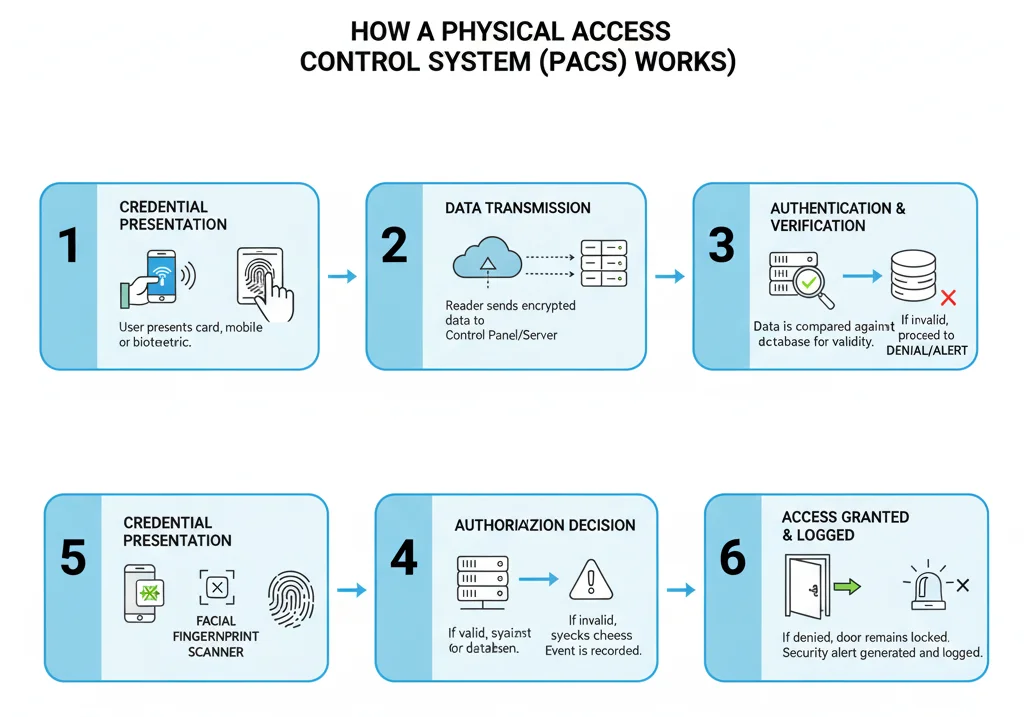
PACS operate through a multi-step process that ensures secure and authorized access.
- Credential Presentation: The user presents their credential at a reader (e.g., swipes a card, enters a PIN, or scans a fingerprint).
- Data Transmission: The credential data is transmitted to the control panel.
- Authentication: The control panel verifies the credential against stored database information.
- Authorization: If valid, the system grants access by unlocking the physical barrier.
- Access Logging: The event is recorded in the system’s audit log.
- Denial and Alert: If invalid, access is denied, and security personnel may be alerted.
This process happens in seconds to allow smooth ingress while maintaining security.
Types of Physical Access Control Systems
Several PACS types cater to diverse security needs:
- Standalone/Lock-and-Key Systems: Basic systems for small areas; use mechanical keys or simple electronic locks; cost-effective but less secure.
- Card-Based Access Control: Uses RFID cards or fobs; suitable for medium to large facilities with user management capabilities.
- Biometric Access Control: Employs fingerprint, facial recognition, or iris scanning; offers higher security by verifying unique physical characteristics.
- Mobile Access Control: Uses smartphones or wearable devices as credentials; enhances convenience and remote management.
- Touchless Access Control: Reduces physical contact using technologies like facial recognition or mobile credentials—important post-COVID-19.
- Hybrid PACS: Combines multiple credential types and technologies for layered security and flexibility.
Each has its advantages depending on use case, security level, and budget.
Authentication Models and Access Control Methods
Different models govern how access permissions are assigned and enforced:
- Discretionary Access Control (DAC): Access rights are assigned by owners or administrators.
- Mandatory Access Control (MAC): Strict, policy-based access controls typically used in government or military settings.
- Role-Based Access Control (RBAC): Assigns access based on user roles—common in corporate environments.
- Rule-Based Access Control: Access depends on defined rules such as time-of-day or location.
- Attribute-Based Access Control: Access decisions are made based on attributes like department, clearance, or device used.
Multi-factor authentication, combining two or more methods (e.g., card + fingerprint), further strengthens security.
Key Benefits of Physical Access Control Systems
Physical access control systems provide numerous advantages:
- Enhanced Security: Reduces risks of unauthorized entry and protects people and assets.
- Centralized Management: Simplifies control over multiple access points and users.
- Detailed Audit Trails: Maintains records useful for compliance and investigations.
- Operational Efficiency: Streamlines access management and reduces reliance on physical keys.
- Regulatory Compliance: Helps meet industry and legal security standards.
- Cost Savings: Lowers security staffing and loss-related expenses over time.
- Scalability: Adapts easily as organizations grow.
- Integration: Works with video surveillance and alarm systems for comprehensive security.
- Real-Time Alerting: Enables quick response to security breaches.
Use Cases and Industry Applications
PACS is vital across multiple industries and facility types:
- Corporate Offices: Secure employee and visitor access.
- Healthcare: Protect patient data and sensitive areas.
- Government: Enforce strict security and clearance levels.
- Financial Services: Safeguard vaults and data rooms.
- Retail and Warehouses: Prevent theft and control delivery access.
- Manufacturing: Protect production lines and hazardous zones.
- Hospitality: Manage guest and staff access efficiently.
- Education: Control access to campuses and sensitive labs.
- Fitness Centers: Manage member access securely.
- Residential Buildings: Enhance tenant safety in communal areas.
Each application implements PACS suited for unique security requirements.
Also Check: What Is a Fingerprint? Patterns, Types, Trends (2025)
Physical Access Control vs. Logical Access Control
Physical access control restricts entry to physical spaces, while logical access control governs access to computer systems and data. Both are crucial and often integrated to provide comprehensive security.
- Physical Access: Gates, door locks, biometric scanners.
- Logical Access: Passwords, usernames, firewall rules.
Organizations benefit from combining these controls to secure infrastructure comprehensively.
Choosing the Right Physical Access Control System
Consider these factors to select the best PACS:
- Security Needs: Level of security required based on threat assessment.
- Budget: Balancing cost and features.
- Facility Size and Type: Number of access points and building complexity.
- User Volume: Employees, contractors, visitors.
- Integration: Compatibility with existing security systems.
- Scalability: Potential for future expansion.
- User Experience: Ease of use and enrollment.
- Compliance: Alignment with industry regulations.
- Deployment preference: On-premises vs. cloud solutions.
- Vendor Reliability: Support, updates, and warranty.
A thorough assessment ensures the system matches organizational needs.
Implementation and Deployment
Effective PACS deployment involves:
- Planning: Site surveys and risk analysis.
- Hardware Installation: Positioning readers, panels, locks.
- Software Configuration: Setting permissions and roles.
- Integration: Link with cameras, alarms, and IT systems.
- Testing: Verify system operation and fail-safes.
- Training: Educate staff and users.
- Rollout: Phased implementation to minimize disruption.
Good planning and execution maximize system effectiveness.
Best Practices for Physical Access Control
Maximize PACS effectiveness with these best practices:
- Conduct regular access audits.
- Manage credentials carefully; revoke when not needed.
- Implement multi-factor authentication.
- Integrate with video surveillance.
- Monitor events in real-time.
- Establish clear incident response plans.
- Maintain hardware and software promptly.
- Manage guest access securely.
- Ensure proper offboarding procedures.
These enhance security posture and system reliability.
Common Challenges and Solutions
Common challenges include:
- Legacy System Integration: Use middleware or phased upgrades.
- User Resistance: Provide training and clear communication.
- Credential Loss: Implement quick deactivation procedures.
- Downtime Risks: Ensure redundancy and backup power.
- Privacy Concerns: Use data encryption and comply with privacy laws.
- Cost Management: Prioritize features; consider phased deployment.
Addressing these issues ensures smooth PACS operation.
Frequently Asked Questions (FAQ)
Q: What are the latest technological advancements in PACS?
A: AI-powered analytics, mobile credentials, cloud management, and advanced biometrics are leading innovations.
Q: How do biometric systems enhance security?
A: By using unique physiological traits, biometrics are difficult to forge or steal.
Q: Can I upgrade an existing system?
A: Many systems support modular upgrades; assess compatibility with current infrastructure.
Q: What’s the typical cost range for PACS?
A: Costs vary widely from hundreds to thousands of dollars depending on system complexity and features.
Q: How does cloud-based PACS compare to on-premise?
A: Cloud offers scalability and remote management; on-premise can offer more control.
Q: What compliance standards do PACS address?
A: Standards include ISO 27001, HIPAA for healthcare, GDPR for data protection, and others per industry.
Q: How secure are mobile access credentials?
A: Generally secure due to encryption and remote management capabilities; risks depend on device security.
Q: What happens if the system fails?
A: Most systems have fail-safe modes and backup power to ensure continuous security.
Conclusion
Physical access control systems are indispensable tools for protecting today’s physical and digital infrastructure. They provide scalable, manageable, and robust security to safeguard people, property, and sensitive information. Selecting the right system and implementing best practices ensures organizations stay secure in a rapidly evolving threat landscape. With this guide, you are equipped to make knowledgeable decisions on PACS and enhance your organization’s security posture.



