
If you have ever typed a website address into your browser and watched it load in a second or two, you have quietly relied on one of the most important systems on the internet: DNS. When people ask, “what is a DNS and why does it matter?”, they’re really asking how the internet knows where to send them when they type in something like example.com.
DNS may sound technical, but the basic idea is simple: it is like the internet’s phone book. It translates human-friendly names (like google.com) into machine-friendly numbers (IP addresses) that computers use to find each other. Without DNS, we would all have to remember long strings of numbers just to visit a website.
In this detailed guide, you’ll learn what DNS is, why it exists, how it works behind the scenes, the different types of DNS servers and records, and how it affects website speed, SEO, and security. By the end, you’ll have a clear, practical understanding of this essential internet technology.
What Is a DNS?

DNS stands for Domain Name System. When people ask “what is a DNS in simple terms?”, the easiest explanation is:
DNS is a system that converts human-readable domain names (like mywebsite.com) into IP addresses (like 203.0.113.5) that computers use to identify each other on a network.
Every device that connects to the internet has an IP address. However, IP addresses are hard for humans to remember and use. DNS solves this problem by acting as an automatic translator. You type a domain name; DNS finds the correct IP address and sends you to the right server.
Why DNS Exists
In the early days of the internet, there were only a small number of computers, and a simple text file was used to map names to IP addresses. As the internet grew, this approach became impossible to manage. A scalable, distributed system was needed.
DNS was created to:
- Make the web easy to use by allowing names instead of numbers
- Distribute the workload of name-to-IP translation across many servers
- Allow domains to be added, removed, or updated without breaking the whole system
- Improve resilience, so no single server failure could take down all address lookups
The Phone Book Analogy
Think of DNS as a global, constantly updated phone book:
- You know a name (like facebook.com) but not the number.
- DNS looks up the name in its “phone book.”
- It finds the associated “phone number” (IP address).
- Your browser uses that IP address to connect to the correct server.
This all happens within milliseconds, every time you visit a website, click a link, open an app that connects to the internet, or send an email.
How DNS Works (Step-by-Step)
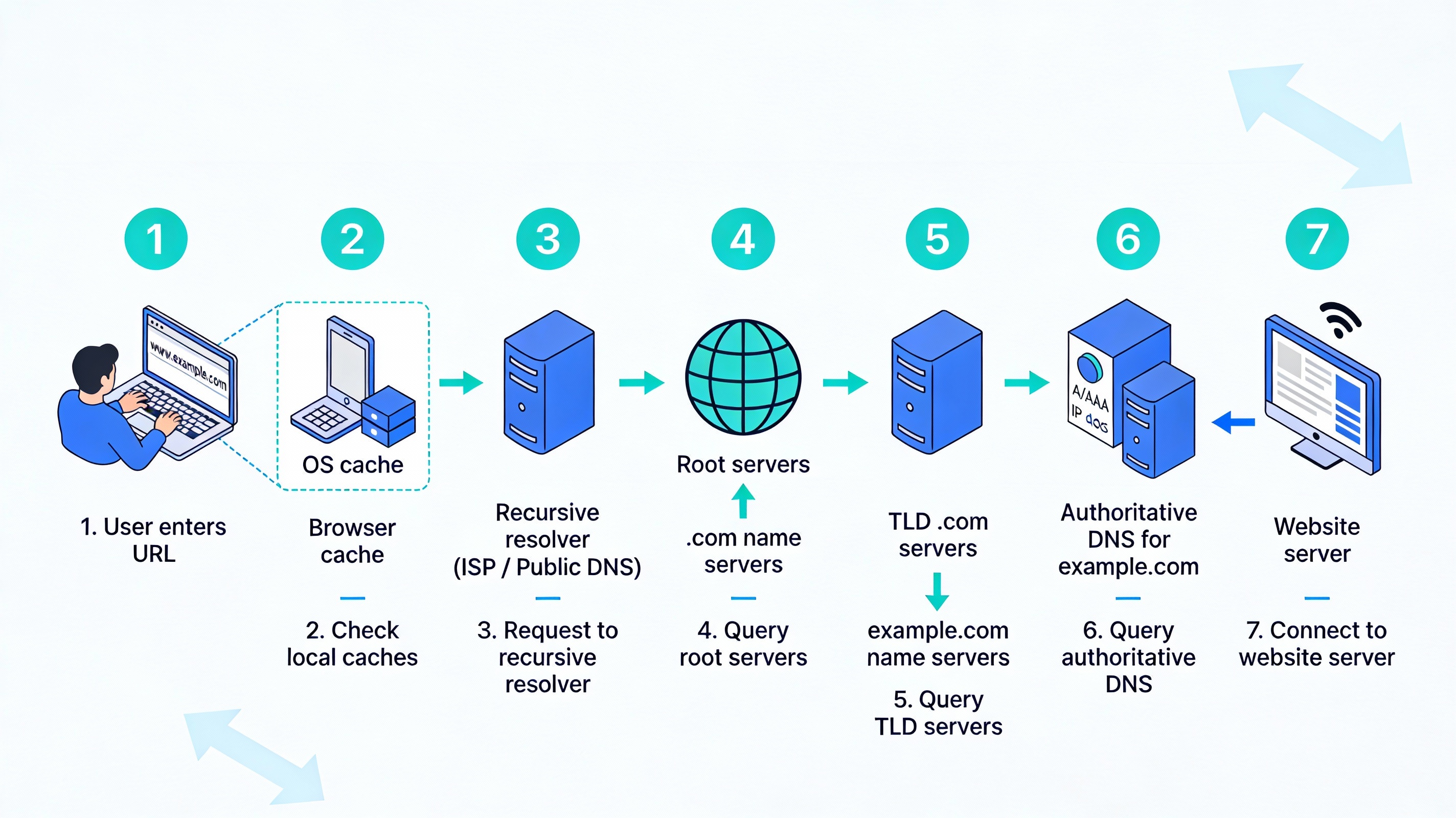
To really understand what is a DNS, it helps to walk through the process your device goes through when you enter a website URL in your browser.
1. You Enter a Domain Name
You type www.example.com into your web browser and hit Enter. The browser needs the IP address of www.example.com, so it starts a DNS lookup (also called a DNS query).
2. Your Device Checks Local Cache
Before asking any servers, your device checks its own memory:
- Your browser has a small DNS cache.
- Your operating system (Windows, macOS, Linux, etc.) has another DNS cache.
If your device has recently visited the domain, the answer may already be stored. If so, it can skip the rest of the process and go straight to the website.
3. The Request Goes to a Recursive Resolver
If the address is not in the local cache, your device sends the DNS query to a recursive resolver (also called a DNS resolver). This is usually provided by:
- Your internet service provider (ISP)
- A public DNS service like Google DNS (8.8.8.8) or Cloudflare DNS (1.1.1.1)
The recursive resolver’s job is to find the answer on your behalf. It will check its own cache first. If it doesn’t have the answer, it starts a series of queries to other DNS servers.
4. Querying the Root DNS Servers
If the resolver can’t answer from its cache, it asks the root DNS servers. These servers are the top level of the DNS hierarchy. There are only a limited number of root server clusters, distributed globally.
The root servers don’t know the exact IP address of www.example.com, but they do know where to find the servers responsible for the top-level domain (TLD), such as .com, .org, .net, etc.
So, the root server replies with a referral: “Here is the address of the .com name servers.”
5. Querying the TLD Name Servers
Next, the recursive resolver asks the relevant TLD name servers for information about example.com. These TLD servers handle all domains under a particular extension (like .com).
The TLD servers usually don’t know the final IP address either, but they know which authoritative name servers are responsible for example.com.
The TLD server replies with: “Here are the authoritative name servers for example.com.”
6. Querying the Authoritative Name Server
The recursive resolver then queries the authoritative DNS server for example.com. This server stores the actual DNS records for the domain, including the IP address for www.example.com.
The authoritative server responds with an A record (IPv4) or an AAAA record (IPv6) that contains the IP address.
Also Read: What is Social Media Privacy and Prevention
7. Returning the Answer to Your Device
The recursive resolver:
- Sends the IP address back to your device
- Stores (caches) the answer for a certain amount of time (defined by the record’s TTL – Time To Live)
Your browser now has the IP address and can connect directly to the web server hosting the site. All of this usually happens in a fraction of a second.
Key Components of the Domain Name System
To fully understand what is DNS, it helps to know the main parts that work together to make it function.
Domain Names
A domain name is the address you type into a browser, such as mybusiness.com. It is made up of different parts:
- Top-Level Domain (TLD): The extension at the end, like
.com,.org,.net, or country codes like.uk,.de. - Second-Level Domain (SLD): The main part of the name, like mybusiness in mybusiness.com.
- Subdomain: A prefix before the main domain, like
wwworblog(e.g.,blog.mybusiness.com).
DNS Zones and Zone Files
DNS is organized into zones. A DNS zone is a portion of the domain name space that a particular organization or administrator manages. Each zone has a zone file that stores DNS records for that zone.
For example:
example.commay be one DNS zone.subdomain.example.comcould be managed as a separate zone.
Recursive vs. Authoritative DNS Servers
DNS servers fall into two main categories:
- Recursive resolvers: These servers receive your query (like “what IP belongs to
example.com?”) and do the work of finding the answer. They usually belong to ISPs or public DNS providers. - Authoritative name servers: These servers store the actual DNS records for specific domains. They provide the final answer, such as the IP for a website or mail server.
Common Types of DNS Records
DNS records are individual instructions within a DNS zone file. Each record tells the DNS system how to handle a particular part of a domain. Understanding them will deepen your grasp of what DNS does in practice.
A and AAAA Records
- A record: Maps a domain or subdomain to an IPv4 address, such as
203.0.113.5. - AAAA record: Maps a domain or subdomain to an IPv6 address, such as
2001:db8::1.
These records are the most fundamental because they tell browsers where to find your website server.
CNAME Records
A CNAME (Canonical Name) record maps one domain name to another domain name, rather than to an IP address.
Example:
www.example.com→ CNAME →example.com
This means www.example.com uses the same IP as example.com. CNAMEs are often used for subdomains or services hosted on third-party platforms.
MX Records
MX (Mail Exchange) records tell the internet where to deliver email for a domain.
For example:
example.com→ MX →mail.example.com
If your email is hosted by a service like Google Workspace or Microsoft 365, they provide MX records you must add to your DNS.
TXT Records
TXT records are used to store text information in DNS. They are frequently used for:
- Domain ownership verification (for services like search consoles or email providers)
- Email security frameworks like SPF, DKIM, and DMARC
NS Records
NS (Name Server) records specify which servers are authoritative for a domain. When you change your domain’s nameservers at a registrar, you’re updating the NS records at the registry level.
SOA Record
The SOA (Start of Authority) record is a special record that contains administrative information about the zone, including:
- The primary authoritative name server
- The email of the domain administrator
- Serial number for versioning the zone file
- Default Time To Live (TTL) values
Why DNS Matters for Websites and Businesses
Understanding what is a DNS is not just for technical professionals. It directly affects how your website performs, how secure your online presence is, and how easily users can reach you.
1. Reliability and Uptime
If your DNS is misconfigured or your DNS provider has an outage, users may not be able to reach your website, even if your server is running perfectly. Reliable DNS is essential for:
- Keeping your website online
- Ensuring email continues to work
- Maintaining customer trust
2. Performance and Speed
DNS impacts how quickly your website starts to load. If DNS lookups are slow, the initial connection to your site is delayed, which can:
- Make your site feel sluggish to users
- Increase bounce rates
- Negatively influence user experience metrics that search engines watch
Many businesses use fast, globally distributed DNS providers to reduce lookup times and improve overall site performance.
3. SEO and User Experience
Search engines care deeply about user experience. Slow or unreliable DNS can:
- Lead to longer page load times
- Cause occasional timeouts when crawlers try to access your site
- Hurt your site’s perceived reliability and performance
While DNS itself is not a direct ranking factor, it contributes to critical factors like speed and availability, which are important for SEO.
4. Security Considerations
DNS is also a major target for attackers. Common threats include:
- DNS spoofing / cache poisoning: Attackers insert false DNS records so users are sent to malicious sites.
- DNS hijacking: Attackers gain control of the domain’s DNS and redirect traffic or intercept email.
- DDoS attacks on DNS: Overwhelming DNS servers to make websites unreachable.
To counter these, many organizations use:
- Secure, reputable DNS providers
- DNSSEC (DNS Security Extensions) to verify the authenticity of DNS responses
- Redundant DNS setups using multiple providers or geographic distribution
DNS Caching and TTL Explained
One of the reasons DNS is efficient is caching. Once a resolver learns the answer for a domain, it stores it for a certain amount of time. This reduces the need to repeatedly query root and TLD servers.
What Is TTL?
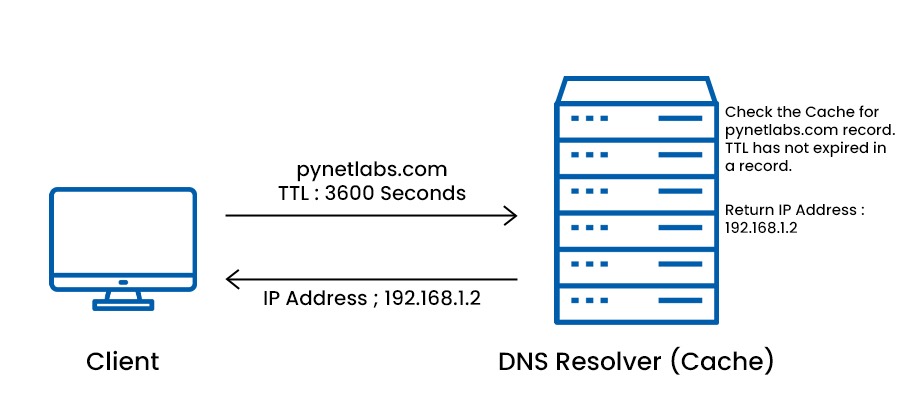
TTL (Time To Live) is a value, in seconds, that tells DNS resolvers how long they can store a record in their cache before they must fetch a fresh copy.
For example:
- TTL of 300 seconds = 5 minutes
- TTL of 3,600 seconds = 1 hour
- TTL of 86,400 seconds = 24 hours
Pros and Cons of High vs. Low TTL
High TTL (longer caching):
- Faster, more efficient lookups for repeated visitors
- Less load on your DNS servers
- Changes to DNS records propagate more slowly
Low TTL (shorter caching):
- Faster propagation of DNS changes
- More flexible during migrations or IP changes
- Potentially more queries and slightly more overhead
A common strategy is to use a higher TTL during normal operation and temporarily lower it before planned changes, such as moving to a different hosting provider.
Managing DNS for Your Domain
Once you understand what DNS is and how it works, managing it becomes less intimidating. Here’s how DNS management typically works for a website owner.
Where You Manage DNS
You usually manage DNS in one of these places:
- Your domain registrar (where you bought the domain)
- Your web hosting provider
- A dedicated DNS provider (like Cloudflare, Route 53, or similar)
The system where your authoritative DNS zone is hosted is where you add and edit DNS records.
Typical DNS Settings for a Website
For a simple website and email setup, you’ll typically configure:
- A / AAAA records for your root domain and
www - MX records for your email provider
- CNAME records for services or subdomains (like
blogorshop) - TXT records for domain verification and email authentication
Common DNS Mistakes
Some frequent issues include:
- Pointing A records to the wrong IP address
- Forgetting to add the
wwwrecord or redirect - Incorrect MX records, causing email delivery failures
- Changing nameservers without copying all existing records
Double-checking DNS changes and allowing time for propagation can help prevent downtime and email issues.
Conclusion
The next time you wonder “what is a DNS and why should I care?”, remember that it is the invisible system that makes the modern internet usable. DNS quietly translates user-friendly domain names into IP addresses, keeps websites reachable, powers email delivery, and plays a key role in security and performance.
Whether you run a small blog, manage a business website, or work in digital marketing, a basic understanding of DNS helps you:
- Troubleshoot issues when a site or email goes down
- Work more effectively with developers and hosting providers
- Make smarter decisions about performance and security
Behind every click, search, and online purchase, DNS is working in the background to connect users to the right place. Knowing how it functions gives you more control over your online presence and a clearer picture of how the web really works.
FAQs
1. What does DNS stand for?
DNS stands for Domain Name System. It is the system that translates human-readable domain names into numeric IP addresses used by computers to locate each other on networks.
2. Why do we need DNS?
We need DNS because it is much easier for humans to remember names than numbers. DNS allows us to use simple domain names while computers use IP addresses behind the scenes. Without DNS, you would need to remember and type full IP addresses to visit every website.
3. What is a DNS server?
A DNS server is a computer that stores and responds to DNS queries. There are different types of DNS servers, including recursive resolvers (which look up answers on behalf of users) and authoritative name servers (which hold the official DNS records for a domain).
4. What happens if DNS goes down?
If DNS goes down or is misconfigured, users may not be able to reach websites or send and receive email, even if the web and mail servers themselves are running. The browser cannot find the correct IP address, so the connection fails.
5. How long do DNS changes take?
DNS changes can take anywhere from a few minutes to 24–48 hours to fully propagate worldwide. The exact time depends on the TTL values previously set and how often different DNS resolvers refresh their cached records.
6. Is DNS secure?
Basic DNS was not designed with strong security in mind, which is why attacks like DNS spoofing and hijacking exist. However, security can be improved by using reputable DNS providers, enabling DNSSEC where possible, and applying best practices for account and domain protection.



