
In today’s digital world, software powers almost everything we do—whether it’s running a business, managing customer data, making online payments, or simply using a smartphone to browse social media. But there’s one hidden truth about software that most people don’t realize:
No software is perfect.
Even brand-new applications can contain bugs, errors, and security loopholes. That’s why software developers continuously release improvements and fixes in the form of updates.
This is where patch management becomes essential.
Patch management is one of the most important strategies in cybersecurity and IT operations. It ensures systems stay protected, stable, and up to date. Without proper patching, businesses and individuals risk cyberattacks, data loss, downtime, and performance issues.
In this in-depth guide, you’ll learn:
- Patch management definition (in simple terms)
- What is patching and why it matters
- How patch management works step-by-step
- Why patching is critical for security and business continuity
- Common patching problems and solutions
- Best practices for individuals and organizations
- FAQs for quick clarity
Let’s start from the basics.
Why Patch Management Matters More Than Ever
Cyber threats are increasing every year, and attackers constantly look for new ways to exploit weaknesses in software systems. Most cyberattacks don’t happen because hackers are “magicians.” They happen because organizations fail to maintain their systems properly—especially when it comes to updates.
Many people ignore updates because they think they’re not important, or they postpone them because they don’t want the inconvenience.
You may have seen messages like:
- “Update available”
- “Security patch ready to install”
- “Restart required to complete updates”
Most users delay these updates thinking they can do it later. But this small delay can lead to big consequences.
Patch management exists to avoid that risk by making sure patches are:
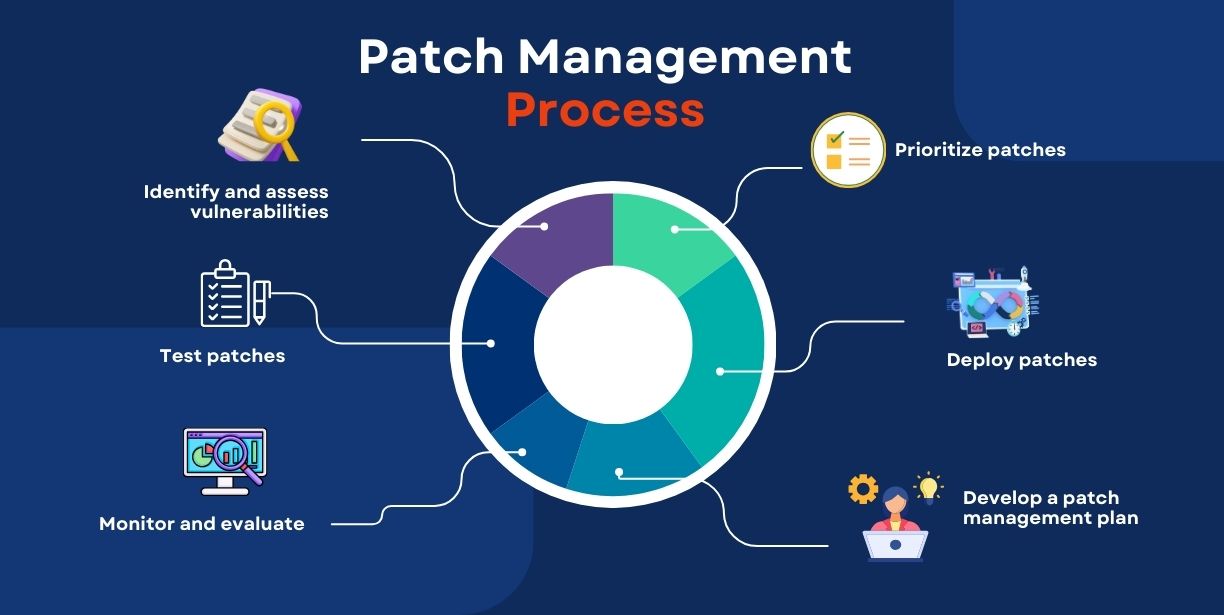
- Identified
- Prioritized
- Installed properly
- Tested
- Verified
So your systems remain safe and functional.
What Is Patch Management?
Let’s break this down clearly.
Patch management is the process of identifying, evaluating, acquiring, testing, and installing patches (software updates) to keep systems secure and working correctly.
A patch is a small piece of code released by developers to:
- Fix security vulnerabilities
- Repair software bugs
- Improve performance
- Enhance features
- Address compatibility issues
So, when we ask “what is patching?”, the simple answer is:
What Is Patching?
Patching is the act of applying a software patch (update) to a system, application, or device to improve its security, stability, or performance.
Patch management is the bigger strategy behind patching. It ensures patching is done safely and consistently, especially in companies where there are dozens, hundreds, or even thousands of devices.
3. Who Needs Patch Management?
Patch management is important for everyone, but the responsibilities differ based on the user type.
For Businesses and Organizations
Patch management is usually handled by:
- IT administrators
- Security teams
- System engineers
- Network admins
Businesses rely on patching to protect:
- Employee laptops and desktops
- Servers and data centers
- Cloud infrastructure
- Customer systems
- Websites and internal tools
Even one unpatched system can become the entry point for a major cyberattack.
For Individual Users
For home users, patch management often means:
- Installing operating system updates on time
- Updating apps and browsers regularly
- Allowing automatic security updates
Even if you’re not running a business, your personal device contains sensitive information like:
- Banking details
- Passwords
- Photos
- Emails
- Personal documents
So patching matters for personal security too.
4. Patch Management Process: Step-by-Step Explanation
Patch management is not just “click update.” A proper patching workflow is structured and strategic—especially for organizations.
Here’s how the typical patch management process works:
Step 1: Establishing and Maintaining Knowledge of Patches
The first step in patch management is to maintain visibility of:
- What systems you have (inventory)
- What software is installed
- What versions are running
- What new patches are available
In companies, this includes tracking patches for:
- Operating systems (Windows, Linux, macOS)
- Browsers (Chrome, Firefox)
- Applications (office software, email tools)
- Network equipment (routers, firewalls)
- Third-party tools (plugins, frameworks)
If you don’t know what’s installed in your environment, you can’t protect it.
Step 2: Identifying Which Patches Are Needed
Not every patch is equally urgent. Some patches are optional feature upgrades, while others are emergency security fixes.
This stage involves:
- Reviewing patch notes and vendor details
- Identifying severity (critical, high, medium, low)
- Checking compatibility with current systems
- Prioritizing security-related patches
For example:
- A patch fixing a critical vulnerability in an operating system should be installed urgently.
- A minor UI improvement in an application can wait.
This filtering is a major part of why patch management is more than basic patching.
Step 3: Deploying Patches Correctly
Once patches are selected, they must be installed carefully.
This includes:
- Scheduling patch installation
- Avoiding disruption during business hours
- Ensuring proper permissions and admin rights
- Installing patches in the right order (if required)
One common mistake is patching systems randomly without proper scheduling. This can cause:
- downtime
- user complaints
- broken integrations
Businesses often deploy patches in batches instead of all at once.
Step 4: Testing Systems After Patch Installation
Testing is a major step that many people ignore.
After patching:
- Does the application still open?
- Are all services running correctly?
- Are there any unexpected errors?
- Has system performance changed?
- Did security improve as expected?
For businesses, patches are often tested first on:
- non-critical devices
- staging servers
- test environments
This reduces the risk of patch-related failures in production systems.
Step 5: Confirming Patch Results and Monitoring
Patch management doesn’t end after installation.
The final part includes:
- verifying patch success rates
- checking system logs
- reviewing security reports
- ensuring systems remain stable
If a patch fails, it may need:
- reinstallation
- rollback
- deeper troubleshooting
Monitoring helps ensure that patches did their job—improving security and performance without creating new problems.
5. Why Is Patch Management Needed?
Now that you understand the process, let’s answer the big question:
Why is patch management so important?
Because modern software is constantly under threat.
Even the newest systems can become vulnerable quickly due to:
1. Software Becomes Outdated Fast
Software development changes rapidly. New features, frameworks, and updates are released constantly.
If you don’t patch regularly, your software becomes outdated—and outdated software often becomes insecure.
2. Hackers Exploit Vulnerabilities
Cybercriminals actively look for vulnerabilities in popular software.
Once a weakness is discovered, attackers:
- create exploit methods
- share them with other hackers
- target systems that haven’t been patched
This creates an ongoing “cat and mouse” battle between:
- software developers releasing patches
- hackers trying to exploit gaps before patching happens
3. Patch Announcements Can Increase Risk
When a vendor releases a patch, it often includes information about:
- what vulnerability was fixed
- how it impacted the system
This can alert attackers that:
“This system has a weakness.”
So if organizations delay patching, attackers may exploit that window.
In simple words:
Patch availability = vulnerability confirmed
And delayed patching makes systems an easy target.
6. Patch Management Problems (Common Challenges)
Even though patching is essential, it can create issues if done incorrectly.
Here are the most common patch management problems:
1. Patches Can Break Functionality
A patch is often a “quick fix” rather than a full redesign.
Sometimes, a patch can cause:
- compatibility issues
- application crashes
- performance slowdowns
- system instability
This is why testing is important.
2. Downtime and Operational Disruption
Patching may require:
- system restarts
- temporary service outages
- interrupted workflows
Businesses that patch without planning may face:
- productivity loss
- customer experience issues
3. Lack of Visibility
Many organizations don’t have a clear view of:
- which devices exist
- which software is installed
- what is unpatched
This causes patch gaps and missed updates.
4. Human Error
Manual patching increases the chance of mistakes, such as:
- forgetting a system
- patching the wrong version
- skipping critical updates
- misconfiguring settings
This is why patch management needs structure.
5. Too Many Updates, Too Little Time
Large companies deal with hundreds of updates monthly.
Without proper patch management strategy, patching becomes overwhelming.
7. Patch Management Solutions and Best Practices
The goal of patch management is not just patching fast, but patching safely and correctly.
Here are practical solutions and best practices:
1. Backup Before Patching
Always take backups so you can restore systems if a patch causes problems.
Backups should include:
- system images
- important files
- configuration settings
2. Test Patches on Non-Critical Systems
Before rolling out patches everywhere, test them on:
- small groups of machines
- secondary systems
- staging environments
This helps catch unexpected issues early.
3. Prioritize Critical Security Updates
Not all patches are equal.
Patch priorities should be based on:
- security severity
- exploit likelihood
- business impact
- exposure level
Critical vulnerabilities should be patched immediately.
4. Create a Patch Schedule
For organizations, patching should happen on a schedule such as:
- weekly
- bi-weekly
- monthly
Emergency patches can be applied outside the regular schedule.
5. Maintain Asset and Software Inventory
Know your environment. Track:
- devices
- software versions
- operating systems
- installed applications
This makes patching more organized.
6. Monitor Patch Results
After installing updates:
- check logs
- confirm successful deployment
- verify stability
Patching without verification creates a false sense of security.
7. Automate Where Possible
Automation reduces:
- human mistakes
- missed patches
- inconsistent patching
Many businesses use centralized tools to manage patching across devices.
8. Patch Management for Home Users: Simple Tips
Even if you’re not in IT, you can still improve your patching habits.
Best Patch Management Habits for Individuals
- Enable automatic updates
- Update your browser and apps regularly
- Restart devices when updates require it
- Avoid using outdated software versions
- Uninstall unused apps to reduce risk
- Keep your antivirus and security tools updated
For most users, simple consistency is enough to improve security significantly.
Conclusion
Patch management is one of the most practical and powerful cybersecurity strategies. It ensures that your systems remain protected against evolving threats, while also improving performance and fixing bugs over time.
To summarize:
- What is patching?
It’s applying updates that fix vulnerabilities and improve software. - Patch management definition:
The structured process of identifying, testing, installing, and monitoring patches across systems.
Patching regularly is not just about staying updated—it’s about staying protected.
Whether you’re managing a large organization or simply protecting your personal laptop, patch management should be treated as a non-negotiable part of digital safety.
FAQs
What is patch management?
Patch management is the process of identifying, acquiring, testing, installing, and monitoring software patches to keep systems secure and stable.
What is patching in cybersecurity?
Patching means applying updates that fix security vulnerabilities, repair bugs, and improve system performance.
Why is patch management important?
Because unpatched systems are vulnerable to cyberattacks, malware infections, and data breaches. Patching helps close security holes quickly.
What happens if patching is delayed?
Delaying patches increases the chance that attackers will exploit known vulnerabilities, leading to data loss, downtime, or system compromise.
Can patches cause problems?
Yes. Poorly tested patches may cause crashes or compatibility issues. That’s why backups and testing are essential before full deployment.
How often should patch management be done?
For businesses, a monthly schedule is common, with emergency patching for critical security fixes. For individuals, enable automatic updates and install patches as soon as they’re available.

Debabrata Behera is a passionate blogger who writes about digital trends, personal growth, and practical insights, helping readers stay informed, inspired, and ready to achieve success in life.



