
Cryptolocker is one of the most infamous names in the history of ransomware. Even though the original Cryptolocker campaign was taken down years ago, its legacy lives on through copycat variants, similar malware families, and a constant stream of evolving ransomware threats. Understanding what Cryptolocker is, how it works, and how to protect yourself is essential for anyone who uses a computer in today’s connected world.
What Is Cryptolocker?
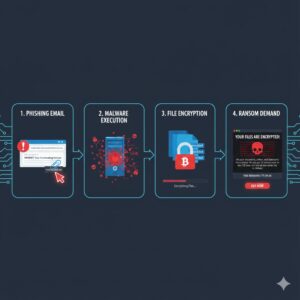
Cryptolocker is a form of malicious software known as ransomware. Once it infects a computer, it encrypts (locks) the victim’s files using strong cryptography and then demands a ransom payment, usually in cryptocurrency, in exchange for the decryption key. Without that key, the encrypted files are essentially unusable.
The original Cryptolocker first appeared around 2013 and primarily targeted Windows systems. It spread quickly through email attachments and exploit kits, hitting hundreds of thousands of computers worldwide. Victims would suddenly find their documents, images, spreadsheets, and other valuable data rendered inaccessible, with a threatening ransom note displayed on their screen.
While law enforcement eventually disrupted the main Cryptolocker infrastructure, the name became synonymous with ransomware. Today, many people still use the term “cryptolocker” as a generic label for file-encrypting ransomware, even if the underlying malware is technically different.
How Does Cryptolocker Work?

Ransomware like Cryptolocker follows a typical infection and attack pattern. Understanding this lifecycle can help you recognize the warning signs and reduce your risk of a successful attack.
1. Initial Infection
Cryptolocker usually begins its attack with a successful infection vector. Common entry points include:
- Malicious email attachments: Often disguised as invoices, shipping confirmations, resumes, or scanned documents. When users open the file and enable macros or run embedded code, the malware is executed.
- Malicious links: Emails or messages that encourage users to click a link leading to a compromised website that automatically downloads the malware.
- Exploit kits and vulnerabilities: Visiting a compromised site with an outdated browser, plugin, or operating system can trigger a “drive-by download” that installs the cryptolocker payload without obvious user interaction.
- Trojanized software: Pirated or fake software installers bundled with hidden ransomware components.
2. Establishing a Foothold
Once inside the system, Cryptolocker typically:
- Copies itself to hidden or system directories.
- Modifies registry entries to ensure it runs every time the computer starts.
- Attempts to disable security tools or avoid detection by antivirus products.
- Connects to a command-and-control (C2) server controlled by the attackers.
This communication channel allows the malware to receive instructions and, in classic Cryptolocker variants, obtain the public encryption key used to lock the victim’s files.
3. File Encryption
File encryption is the heart of the Cryptolocker attack. Once active, the malware scans the system—and sometimes connected network drives or external storage—for specific file types:
- Documents (e.g., .doc, .docx, .pdf, .txt)
- Spreadsheets and databases (e.g., .xls, .xlsx, .mdb)
- Images and media files (e.g., .jpg, .png, .mp3)
- Design, project, and backup files (e.g., .psd, .cad, .bak)
Cryptolocker then encrypts these files using strong algorithms such as RSA. In the original strain, the encryption keys were generated on the attacker’s remote server, not on the victim’s machine. This meant that even if a security researcher analyzed the infected system, they could not simply “reverse” the encryption without that private key.
During this phase, performance may slow down, and some files may suddenly appear corrupted or inaccessible. Some variants may also:
- Rename files or append a specific extension.
- Delete shadow copies and local backups to prevent easy recovery.
- Encrypt files on mapped network drives, affecting shared company data.
4. Ransom Demand
After the encryption process completes, Cryptolocker reveals itself fully:
- A ransom note is displayed on the screen, often as a pop-up window and text or HTML file on the desktop.
- The note explains that files have been encrypted and that the only way to regain access is to pay a ransom.
- Victims are typically given a deadline—often 72 hours—to pay, with threats that the decryption key will be deleted if the deadline passes.
- Payment instructions usually involve cryptocurrency such as Bitcoin, making it difficult to trace the attackers.
The ransom note is intentionally alarming and urgent. It leverages fear, confusion, and time pressure to push victims into paying before they explore alternative options.
Also Read: What is Cryptojacking and How Does It Work? A Complete Guide
5. Decryption (If Ransom Is Paid)
Not all cybercriminals are “honest thieves,” but the original Cryptolocker operators often did provide decryption keys to victims who paid. This business-like behavior encouraged others to pay, reinforcing the attackers’ revenue stream.
However, paying the ransom remains highly risky:
- There is no guarantee you will receive a working decryption key.
- You may still suffer data loss or corruption.
- Paying encourages and funds future attacks.
- You may be targeted again since you are now known as a paying victim.
Security professionals and law enforcement agencies strongly advise against paying ransoms when possible, emphasizing robust backups and incident response instead.
The History and Evolution of Cryptolocker

Understanding the story behind Cryptolocker helps explain why it remains a reference point whenever new ransomware emerges.
Origins of the Cryptolocker Campaign
Cryptolocker first appeared in 2013 and quickly became one of the first ransomware threats to gain massive global attention. Key characteristics included:
- Distribution via botnets such as Gameover Zeus, which were already installed on large numbers of machines.
- Highly effective social engineering through convincing phishing emails.
- Seemingly unbreakable RSA-2048 encryption, which made brute-force decryption impractical.
In just a few months, estimates suggest that Cryptolocker infected hundreds of thousands of computers and extorted millions of dollars from victims worldwide.
Law Enforcement Takedown
In 2014, an international law enforcement effort, including the FBI and allies, disrupted the Cryptolocker infrastructure as part of Operation Tovar. Authorities seized control of servers and the Gameover Zeus botnet, severely limiting Cryptolocker’s ability to operate.
Following this operation, security researchers were able to obtain a large number of private keys used in the original attacks. They created free tools to help some victims decrypt their files without paying. While this was a success story, it did not eliminate the broader problem of ransomware.
Copycats and Successor Ransomware
Although the original Cryptolocker campaign was neutralized, its success inspired many imitators. New ransomware families adopted similar techniques and sometimes even used the Cryptolocker name to appear more threatening. Some notable descendants and related threats include:
- CryptoWall
- Locky
- CryptoDefense
- WannaCry (different technically, but similar concept of encrypting data and demanding ransom)
Over time, these newer variants refined the cryptolocker model, adding features like:
- Double extortion (exfiltrating data and threatening to publish it).
- Targeted attacks against businesses and critical infrastructure.
- Ransomware-as-a-Service (RaaS), letting affiliates “rent” malware and share profits.
Today, “cryptolocker” often serves as a shorthand for this entire class of file-encrypting, ransom-demanding malware.
How to Recognize a Cryptolocker Infection
Early detection is critical. The sooner you notice something is wrong, the greater your chance of limiting the damage.
Warning Signs and Symptoms
Signs that a cryptolocker-type ransomware may be active include:
- Sudden file inaccessibility: Documents and images that opened yesterday now trigger error messages or appear with strange extensions.
- Unusual file extensions: Files renamed with unfamiliar extensions or suffixes that weren’t there before.
- Ransom notes: Text files, HTML pages, or image files in folders with names like “HOW_TO_DECRYPT.txt” or “DECRYPT_INSTRUCTIONS.html”.
- Desktop changes: New wallpaper showing a ransom message or instructions to pay.
- Performance issues: The system becomes slow while the ransomware scans and encrypts files.
Common Ransom Note Characteristics
While designs vary, typical cryptolocker ransom notes share some traits:
- Clear statement that your files have been encrypted.
- Claim that only the attackers hold the decryption key.
- Deadline after which the key will be destroyed or the ransom will increase.
- Instructions to purchase cryptocurrency and send it to a specified address.
- Occasional “support” contacts or chat portals to communicate with the attackers.
Who Is Targeted by Cryptolocker-Style Ransomware?
Early ransomware often seemed to target individual home users, but modern campaigns affect everyone from small businesses to global enterprises.
Home Users
Individual users are attractive targets because they often lack robust backups and advanced security tools. Personal photos, important documents, and schoolwork can all be locked by a cryptolocker infection. Attackers know that emotional value can be powerful leverage.
Small and Medium-Sized Businesses
Smaller organizations are frequent victims because:
- They maintain valuable business data but may lack dedicated security staff.
- Downtime can be extremely costly, pushing them toward paying the ransom.
- They may rely on a small number of shared servers or NAS devices, which become single points of failure if compromised by ransomware.
Large Enterprises and Public Sector Organizations
Modern ransomware groups, following the cryptolocker model, often target:
- Hospitals and healthcare providers.
- Schools and universities.
- Government agencies and municipalities.
- Manufacturing and critical infrastructure companies.
These environments hold highly sensitive data and depend on continuous operations. Attackers exploit this urgency, demanding massive ransoms and threatening public data leaks if payment is refused.
How to Protect Yourself Against Cryptolocker
Defending against cryptolocker-style ransomware requires a combination of technical safeguards, good cyber hygiene, and solid planning. No single measure is enough; layered security dramatically reduces your risk.
1. Maintain Regular, Secure Backups
Backups are your strongest defense against any cryptolocker infection. If you have clean, recent copies of your data, you may be able to recover without paying a ransom.
- Follow the 3-2-1 rule: Keep at least 3 copies of your data, on 2 different media, with 1 copy stored offsite.
- Use offline or immutable backups: Backups directly accessible from your network can also be encrypted by ransomware. Use backup solutions that are offline, write-once, or versioned.
- Test your restores: Regularly verify that you can restore data successfully and that backup procedures actually work in real scenarios.
2. Keep Systems and Software Updated
Many cryptolocker infections begin with the exploitation of known vulnerabilities in operating systems, browsers, or plugins.
- Enable automatic updates on Windows, macOS, and other operating systems when possible.
- Patch business applications, databases, and web servers promptly.
- Uninstall or disable unnecessary plugins (like outdated Java or Flash components).
3. Use Robust Security Software
Modern antivirus and endpoint protection platforms can help detect and block many ransomware threats.
- Install reputable anti-malware software on all devices.
- Enable real-time protection and heuristics that can detect suspicious encryption activity.
- Consider endpoint detection and response (EDR) tools in business environments for deeper visibility.
4. Strengthen Email Security
Email remains one of the most common delivery mechanisms for cryptolocker attacks.
- Use email filtering solutions to scan and block malicious attachments and links.
- Disable macros by default in Office documents received via email.
- Implement SPF, DKIM, and DMARC to reduce spoofed emails pretending to be from trusted contacts.
5. Educate Users and Employees
Humans are often the weakest link in security defenses. Awareness training is crucial:
- Teach users how to recognize phishing emails, suspicious attachments, and unexpected file prompts.
- Emphasize that they should not enable macros or run unknown executables from untrusted sources.
- Encourage immediate reporting of suspicious activity to IT or security teams.
6. Limit User Privileges
Cryptolocker malware can do less damage if it runs under an account with limited permissions.
- Avoid giving users local administrator rights unless absolutely necessary.
- Segment networks so that a compromise on one machine doesn’t automatically give access to all servers and shares.
- Use the principle of least privilege to restrict access to only the data and systems each role requires.
7. Implement Network and Application Controls
Additional defensive layers can help contain or prevent cryptolocker infections:
- Use firewalls to block known malicious IPs and domains.
- Restrict execution of unknown or unsigned applications through application whitelisting where feasible.
- Monitor network traffic for unusual patterns, such as large volumes of outbound encrypted data.
What to Do If You’re Infected by Cryptolocker
Despite the best defenses, no environment is completely immune. If you suspect or confirm a cryptolocker infection, acting quickly can limit damage.
Step 1: Isolate the Affected Systems
- Disconnect the infected machine from the network immediately (unplug Ethernet, disable Wi-Fi).
- Disconnect any external drives or USB devices that may be attached.
- Avoid powering off servers abruptly if they host critical services; consult your IT or incident response team.
Step 2: Identify the Ransomware Variant
Knowing exactly what strain you’re dealing with can guide recovery efforts.
- Take screenshots of ransom notes and file extensions.
- Use reputable ransomware identification tools from security vendors or organizations.
- Consult with cybersecurity professionals or your managed service provider (MSP).
Step 3: Check for Decryption Tools
For some older or poorly designed ransomware variants, security researchers have developed free decryption tools.
- Search trusted sites and initiatives that catalog decrypters and removal tools.
- Never download “cracks” or tools from unknown forums promising miracle fixes; these can be additional malware.
Step 4: Restore from Clean Backups
If no decryption tool is available and you have backups:
- Completely remove the malware from the system with professional guidance or reputable cleaning tools.
- Reformat or rebuild systems if necessary to ensure no remnants remain.
- Restore data from backups that predate the infection.
Step 5: Evaluate Whether to Pay the Ransom
Paying the ransom is generally discouraged, but reality can be complex:
- Consider legal and regulatory obligations, especially for businesses handling sensitive data.
- Consult law enforcement and cybersecurity experts before making any decisions.
- Understand that paying does not ensure successful file recovery or prevent future attacks.
Step 6: Report the Incident
Reporting helps improve collective defenses and may assist in law enforcement investigations.
- Notify relevant authorities or cybercrime reporting agencies in your region.
- If personal data is involved, assess whether data breach notification laws apply.
- Document the incident thoroughly for internal review and insurance purposes.
Step 7: Strengthen Defenses Post-Incident
After dealing with a cryptolocker infection, conduct a full post-mortem:
- Identify how the malware entered your environment.
- Close the gaps (technical, process, or training) that allowed the attack.
- Update incident response plans, backup strategies, and user training materials.
Why Cryptolocker Still Matters Today
Even though the original Cryptolocker operation is no longer active, its impact on cybersecurity persists. It marked a turning point where ransomware moved from a niche annoyance to a global, organized criminal enterprise.
Understanding cryptolocker teaches several enduring lessons:
- Data is a prime target: Rather than stealing information, criminals can simply encrypt it and extort victims.
- Strong encryption is a double-edged sword: The same technologies that protect legitimate data can become powerful tools for criminals when misused.
- Prevention and resilience are critical: Once files are encrypted by a well-implemented cryptolocker, decryption without the key is often impossible. Preparation and backups are key.
- Ransomware is evolving: New variants build on the cryptolocker model, adding data theft, extortion, and targeted attacks.
Conclusion
Cryptolocker is more than just a piece of malware from 2013; it is the blueprint for modern ransomware. Its approach—encrypting files and demanding payment—has been replicated and refined by countless cybercriminal groups worldwide.
Whether you are a home user, small business owner, or part of a large organization, understanding how cryptolocker works and how to defend against it is essential. Strong, tested backups, regular updates, robust security tools, careful user behavior, and a clear incident response plan form the foundation of effective protection.
The cost of prevention is far lower than the potential damage of a successful cryptolocker-style attack. By taking proactive steps today, you significantly reduce the risk of becoming the next victim of ransomware.
FAQs
Is Cryptolocker still a threat today?
The original Cryptolocker infrastructure was disrupted in 2014, but similar ransomware families continue to operate. Many people use “cryptolocker” as a generic term for file-encrypting ransomware, and those modern variants are absolutely still a serious threat.
Can I decrypt my files without paying the ransom?
It depends on the specific ransomware variant. For some older or poorly implemented strains, free decryption tools exist. For well-designed cryptolocker-style malware using strong encryption, decryption without the attacker’s key is often impossible. This is why secure, offline backups are critical.
Should I pay the ransom if my files are encrypted?
Security experts and law enforcement generally advise against paying. Payment does not guarantee that you will get your data back and can encourage further criminal activity. Explore backup restoration, professional assistance, and available decryption tools before considering payment.
How do I remove Cryptolocker from my computer?
Use reputable anti-malware or antivirus products to detect and remove the ransomware. In some cases, a full system wipe and reinstall may be the safest option to ensure complete removal. Always remove the malware before attempting to restore data from backups.
How can I prevent a Cryptolocker infection?
Key prevention steps include:
- Maintaining regular, offline or immutable backups.
- Keeping systems and applications fully updated.
- Using strong antivirus and endpoint protection.
- Training users to recognize phishing attempts.
- Restricting user privileges and segmenting networks.
What should businesses do differently to protect against ransomware?
Businesses should go beyond basic antivirus solutions. This includes:
- Implementing centralized logging and monitoring.
- Deploying EDR solutions and advanced email gateways.
- Creating and testing incident response and disaster recovery plans.
- Regularly auditing security controls and conducting simulated phishing exercises.



